Blog

Blog

How to Do a Site Audit That Drives Real SEO Results

How to Do a Site Audit That Drives Real SEO Results

Blog

How to Do a Site Audit That Drives Real SEO Results

A solid site audit isn't just about running a tool and getting a list of errors. It's a structured investigation into your website's health, and it all starts with a clear plan: first, you figure out what you want to achieve (define your goals), then you gather the necessary data by crawling the site, and finally, you dig into the analysis of its technical SEO, content, and user experience.

This process is the bedrock of any smart SEO strategy, turning a mountain of data into a prioritized, actionable to-do list.

Your Starting Point for a Powerful Site Audit

Before you even think about firing up a crawler, let's get on the same page about what a site audit really is. Think of it as a comprehensive health check for your website. You're not just hunting for broken links; you're on a strategic mission to find hidden growth opportunities, eliminate performance roadblocks, and make sure your site is actually delivering for both users and search engines.

A truly effective audit always starts with clear objectives. What are you actually trying to accomplish here? Are you fighting to recover from a sudden traffic drop? Trying to generate more qualified leads from organic search? Or maybe you're looking to establish your site as an authority in a crowded market. Your goals will be your guide, shaping the entire audit and telling you which metrics really matter.

Setting a Clear Foundation

The sheer scope of a full audit can feel like a lot, but it boils down to three core pillars that work together. Without a good workflow, it's easy to get lost in the weeds, drowning in data points with no clear direction. If you're new to this, it’s a good idea to check out a foundational guide to performing a website audit to get your bearings before you jump in.

This workflow really just maps out the first few crucial moves, taking you from high-level strategy to the actual data collection.
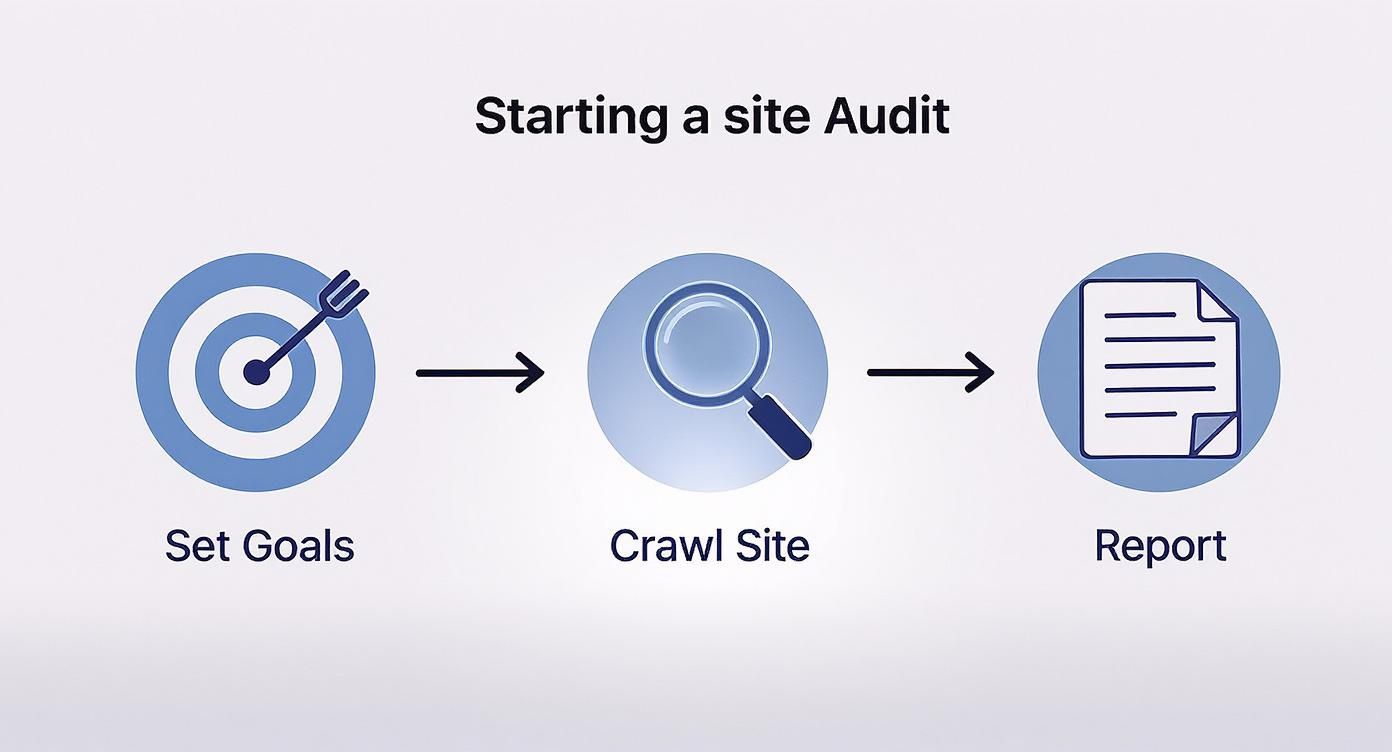
Site audit workflow diagram showing three steps: set goals with target icon, crawl site with magnifying glass, generate report document

Following this simple process from the start ensures your analysis is always tied to real-world business outcomes, not just a random list of technical fixes.

Laying this groundwork keeps you organized and focused. For instance, a SaaS company that wants more demo sign-ups will prioritize fixing user experience hiccups on their main landing pages. On the other hand, an e-commerce store will probably focus on improving page speed for their category pages to stop shoppers from bouncing before they buy.

Key Takeaway: An audit is not just a list of problems. It’s a strategic roadmap that connects technical fixes, content improvements, and UX enhancements directly to your most important business goals. Every action should have a clear "why" behind it.

By defining your purpose first, you create a filter for everything you find later. This simple step ensures every recommendation you make is practical, impactful, and moves the needle on what truly matters for the business. It transforms the audit from a reactive chore into a proactive plan for real growth.

Getting Your Hands Dirty: The Technical SEO Deep Dive

Alright, with your goals clearly defined, it's time to roll up our sleeves and pop the hood on your website. This is the technical deep dive, where we dig into the foundational code and server settings that search engines rely on to understand your content. Think of it this way: a flawless technical setup is non-negotiable. Without it, even the most brilliant content might as well be invisible.

Our first move is to kick off a full site crawl. Using a tool like Screaming Frog or the site audit feature in Ahrefs lets you see your website exactly how a search engine bot does. This crawl spits out a massive list of every URL, image, CSS file, and script on your site, giving you the raw data we'll need for the rest of the audit.
Diagram showing site audit process with robot agent, search icon, XML sitemap, and canonical log

I know, that initial data dump can look like a wall of text. Don't get overwhelmed. Just think of it as your treasure map. The next steps are all about using this map to check the critical pathways search engines use to find, understand, and ultimately rank your pages.

Checking Crawler Directives and Sitemaps

The very first place I always look is the robots.txt file. It’s a simple text file sitting at the root of your domain, but it holds a ton of power—it gives search engine crawlers their marching orders. You need to make absolutely sure it isn't accidentally blocking important sections of your site.

A classic mistake I've seen countless times is a Disallow: / directive left over from when the site was in development. That one little line tells every search bot to turn around and leave. Go check your file and ensure only irrelevant directories (like admin logins or one-off thank-you pages) are disallowed.

Next up is your XML sitemap. This file is essentially a roadmap for search engines, pointing them to all the important URLs you want them to index. During your audit, you’ll want to confirm a few things:

  • Is the sitemap actually submitted in Google Search Console?

  • Does it only contain clean URLs that return a 200 OK status code?

  • Are you including pages that you've blocked with robots.txt or a noindex tag? (You shouldn't be.)

A clean, up-to-date sitemap helps search engines find your content much faster, which is especially useful for new pages that don't have many internal links pointing to them yet.

Uncovering Indexing and Canonicalization Issues

Once you've confirmed that crawlers can actually access your site, you need to find out what's really being indexed. A quick search on Google using the site:yourdomain.com operator will give you a ballpark figure, but your crawl data tells the full story.

You're hunting for pages with a "noindex" meta tag or an "X-Robots-Tag: noindex" in the HTTP header. It's surprisingly common for these tags to be left on pages by mistake, which basically makes them invisible to Google.

This is also where we tackle canonicalization. The canonical tag (rel="canonical") is your way of telling search engines which version of a URL is the "master" copy when you have multiple URLs with similar content. This is absolutely critical for avoiding duplicate content issues that can split your ranking signals and hurt your SEO.

For instance, an e-commerce product page might be accessible through several different URLs with tracking parameters attached. A canonical tag pointing back to the "clean" URL ensures all that juicy link equity gets consolidated to the one page that matters.

Pro Tip: In your crawl report, filter for any URLs that have a canonical tag. Make sure the primary pages are self-referencing and any duplicates correctly point to the master version. A mismatched or broken canonical can create a real mess for your indexing.

Analyzing Redirects and Status Codes

Finally, your audit needs to look at how your site handles redirects and errors. Websites are living things—pages get moved, renamed, or deleted. Managing your HTTP status codes properly is key to a good experience for both users and crawlers.

Here's what you're on the lookout for:

  • 404 Errors (Page Not Found): These are dead ends. Hunt down all internal links pointing to 404 pages and either update the link or, better yet, implement a 301 redirect to a relevant, live page.

  • 301 Redirects (Permanent): These are your friend for permanently moved pages because they pass most of the link equity. But you need to watch out for redirect chains—where one URL redirects to another, which redirects to another. These chains kill your page speed and can dilute link equity.

  • 302 Redirects (Temporary): Use these sparingly. If a page has moved for good, using a 302 instead of a 301 tells search engines not to pass the link equity, which can slowly tank your rankings.

You can't overstate how important these technical checks are; they directly impact your site's ability to show up in search results. The SEO industry itself, which is built on these practices, is projected to hit $106.15 billion by 2030. This growth is a testament to how crucial a solid technical foundation is for any digital strategy. You can learn more about the growth of the SEO market on SearchAtlas.com. By methodically working through these technical elements, you're paving the way for all your other optimization efforts to actually pay off.

5. Dive Into Performance, Speed, and User Experience

Getting the technical SEO right is a huge win, but it's only half the battle. If your pages take an eternity to load or are a nightmare to navigate, you've already lost the user. This is where the audit pivots from pleasing search engine crawlers to delighting the real people who visit your site.

Sketch of smartphone displaying speed gauge next to desktop computer monitor with Apple logo

In today's world, page speed isn't a "nice-to-have" feature; it's an absolute must. It’s a core ranking factor and one of the biggest drivers of user satisfaction. Consider this: a delay of just 1 second in page response can slash customer satisfaction by 16% and drop conversions by a staggering 7%. As you can see from the latest website audit trends on Acclaim.agency, this has become a make-or-break issue.

Decoding Core Web Vitals

Your first stop should be Google's Core Web Vitals. These aren't just vanity metrics; they're Google’s way of quantifying the real-world experience a user has on your page. Fire up a tool like Google PageSpeed Insights to get your report. Don't just obsess over the score at the top—the real gold is in the diagnostics.

Let's quickly break down what you're looking at:

  • Largest Contentful Paint (LCP): How long does it take for the main event—the largest image or text block—to appear? Slow LCP is usually the fault of giant, unoptimized images or a sluggish server. You need to be under 2.5 seconds.

  • Interaction to Next Paint (INP): This metric (which replaced FID in March 2024) measures responsiveness. When a user clicks, taps, or types, how quickly does the page react? High INP is often caused by heavy JavaScript, making a site feel laggy and broken.

  • Cumulative Layout Shift (CLS): This one tracks visual stability. We've all experienced it: you go to tap a button, and an ad loads, shifting the whole page and making you click the wrong thing. That’s a high CLS, and it's incredibly frustrating. It’s often caused by images without defined dimensions.

PageSpeed Insights will hand you a to-do list with specific recommendations, like "Properly size images" or "Eliminate render-blocking resources." These are your first action items for the development team.

Put on Your Mobile-First Goggles

With more than half of all web traffic coming from mobile devices, auditing the mobile experience is non-negotiable. And this goes way beyond just checking if your site is "responsive." You have to actually use it like a mobile user would.

Pull out your phone and load some key pages. Can you read the text without pinching and zooming? Are the buttons big enough to tap without hitting something else by mistake? Those little "tap targets" are a classic point of failure.

A Quick Story from the Trenches: I once audited an e-commerce site with surprisingly low mobile conversions. The culprit? The "Add to Cart" button was so close to the main navigation that users were constantly tapping the wrong thing. They’d get sent to a random page, get frustrated, and just leave.

Keep an eye out for other mobile-specific annoyances. Are there pop-ups you can't close on a small screen? Do you have to type a novel into a tiny form field? Every little bit of friction adds up and sends visitors running to your competitors.

Walk Through the Broader User Journey

Beyond the technical metrics, a great audit considers the overall experience. This is where you need to step back and assess the site's intuitive flow. Navigation is a huge piece of this puzzle. Is it genuinely easy to find what you're looking for, or is the menu a cluttered mess?

Put yourself in the shoes of a first-time visitor with a clear goal.

  • Can you find the pricing page in two clicks or less?

  • Is the search bar easy to spot and actually helpful?

  • Are the calls-to-action (CTAs) obvious and compelling?

This part of the audit is less about data and more about empathy. You're hunting for every point of confusion, hesitation, or frustration that could make someone give up. By smoothing out these rough patches, you create an experience that doesn't just satisfy search engines but turns casual visitors into loyal customers.

Analyzing Your Content and Competitive Landscape

Okay, you've handled the technical groundwork. Now it's time to dig into what really moves the needle: your content. All the technical fixes in the world won't matter if your content doesn't connect with your audience and beat the competition.

This part of the audit is where we shift from code to copy. We'll be looking at everything from the basic on-page signals to the big-picture competitive gaps. It’s not just about spotting what’s broken; it’s about finding opportunities to make your content work harder for you.
Diagram showing thin versus thick content strategy for SEO site audit optimization

Let’s get your content strategy dialed in.

Auditing Core On-Page SEO Elements

Your on-page SEO is the foundation of every single page. Getting these elements right can deliver some surprisingly quick wins. Your crawl data from a tool like Screaming Frog is your best friend here, as it lays everything out in sortable columns.

I always start with the big three:

  • Title Tags: Are they unique? Do they grab your attention? Are they under 60 characters? Most importantly, does the primary keyword feel naturally placed?

  • Meta Descriptions: These don't directly affect rankings, but they absolutely affect clicks. Think of them as ad copy for your search listing. Hunt down any that are missing, duplicated, or just plain boring.

  • Heading Structure (H1s, H2s): This is non-negotiable. Every page needs one—and only one—H1. The rest of your headings (H2s, H3s) should create a logical, scannable outline of the page's content.

Fixing these basics is often low-effort, high-impact work. It brings immediate clarity for both search engines and the real people reading your site.

Here’s a quick checklist I use when running through a page's on-page fundamentals.

On-Page SEO Audit Checklist

Element

What to Check For

Common Mistake

URL

Is it short, readable, and keyword-rich?

Long, auto-generated URLs with numbers and stop words.

Title Tag

Unique, compelling, and under 60 characters.

Missing the primary keyword or being a duplicate of the H1.

Meta Description

Unique, persuasive, and between 150-160 characters.

Leaving it blank, forcing Google to pull random text.

H1 Tag

One per page, clearly stating the page's topic.

Using multiple H1s or stuffing it with keywords.

Subheadings (H2, H3)

Logically structured and breaking up the text.

A giant "wall of text" with no subheadings for scannability.

Image Alt Text

Descriptive and present on all important images.

Leaving alt text empty or just stuffing it with keywords.

Internal Links

Linking to other relevant pages on your site.

"Orphan pages" with no links pointing to or from them.

This table serves as a great quick-reference guide. Once you've shored up these elements, you're ready for the next step.

Performing a Content Gap Analysis

With your own house in order, it's time to see what the neighbors are up to. A content gap analysis is simply the process of finding the valuable keywords your competitors are ranking for that you aren't. Honestly, it's one of the best ways to find proven content ideas.

This isn't just about spreadsheets and keyword lists; it's about strategy. The analysis tells you exactly where customer demand exists and how you can step in to meet it. A key part of building a winning strategy involves conducting a thorough content gap analysis to make sure every piece of content you create has a data-backed purpose.

Key Insight: A content gap isn’t just about missing keywords. It’s about missing topics and entire user intents. Are your competitors answering questions your audience has that you’re completely ignoring?

For instance, you might see a competitor ranking for "best accounting software for freelancers" while all your content is about "small business accounting software." That single keyword difference reveals a specific, high-intent audience you're not speaking to. Digging into these specific queries is a core part of effective long-tail keyword research.

Pruning and Improving Existing Content

Let's be real: not all content is an asset. Over time, any site accumulates pages that are thin, outdated, or just plain underperforming. This isn't just clutter; this low-quality content can actively hurt your site's authority and waste Google's crawl budget.

It’s time to be ruthless. Go through your content, especially the pages with little to no traffic, and make a decision. You have three choices:

  1. Improve: The topic is solid, but the execution is weak. It's thin, the information is from 2018, or it's poorly optimized. These are perfect candidates for a major update and relaunch. Add depth, new data, and better on-page SEO.

  2. Consolidate: You have three different blog posts that all essentially cover "how to change a tire." This is a classic mistake. Combine them into one definitive, comprehensive guide and redirect the old URLs to your new pillar page.

  3. Prune: The content is totally irrelevant, gets zero traffic, and has no valuable backlinks. It's dead weight. Deleting the page and setting up a 410 "Gone" status (or a redirect to a relevant category page) is the smartest move.

Think this sounds extreme? The team at Siege Media famously saw a 50% traffic increase after deleting 15% of their old posts. This proves that quality crushes quantity, every time. By clearing out the dead wood, you help Google focus on your best stuff, which can lift your entire site.

Analyzing Link Authority and Site Security

A website's reputation really boils down to two things: who it associates with (its backlink profile) and how well it protects its visitors (its security). This stage of the audit shifts our focus from on-page elements to the external signals that build authority and the technical safeguards that create user trust.

We’ll start by looking at your internal linking. Think of it as your site's circulatory system. A well-planned internal linking strategy efficiently spreads authority—that "link juice" we all talk about—from your strongest pages throughout the rest of your site. More than that, it creates clear pathways for both visitors and search engine crawlers, guiding them to your most important content.

One of the most common problems I find here is orphaned pages. These are pages that have no internal links pointing to them. They're effectively stranded on an island, making them incredibly difficult for Google to discover, crawl, and ultimately rank.

Digging Into Your Backlink Profile

Now, let's turn our attention outward to your backlinks. Your backlink profile is a massive ranking factor, but it's a classic case of quality over quantity. A few powerful links from well-respected, relevant websites will do more for you than a thousand links from spammy, low-quality directories.

When you're evaluating your backlinks, you're wearing two hats:

  • Spot the High-Value Links: The first job is to identify the links coming from authoritative sites in your niche. These are your crown jewels. Figure out how you got them. Was it a guest post? Original research that got cited? A collaboration? Understanding this gives you a proven playbook for your future link-building campaigns.

  • Hunt for Toxic Links: The flip side is finding potentially harmful links. A sudden spike in backlinks from casino sites, foreign-language forums, or other irrelevant sources can set off alarm bells for search engines.

It’s important to get a clear picture of your backlink profile's overall strength. You can begin by getting a general feel for your site's authority score. For a more detailed look, our guide explains how to find domain authority and what those numbers really mean. If you do find a pattern of truly toxic links that you can't get removed, the Google Disavow Tool is your last resort—but use it with caution.

A Quick Tip from Experience: Don't freak out over a few weird-looking links. Google's gotten pretty good at just ignoring most random spam. I only recommend disavowing when there’s clear evidence of a large-scale negative SEO attack or you've been hit with a manual action penalty.

Performing Essential Security Checks

Finally, let’s talk security. With data breaches in the news constantly, a secure website isn't a "nice-to-have"—it's a requirement. It’s a huge factor for user trust and a confirmed ranking signal. The cornerstone of web security today is HTTPS.

Your entire website needs to be served over HTTPS, not just your login or checkout pages. A site crawler can help you sniff out any old URLs still using the insecure HTTP protocol. These should be 301 redirected to their secure HTTPS versions right away.

Another security flaw to watch for is mixed content. This happens when an otherwise secure HTTPS page loads an insecure resource (like an image, script, or stylesheet) over an HTTP connection. Most modern browsers will block this content and show users a scary warning message, which absolutely kills trust and can break your page's functionality.

A thorough audit should flag every single instance of mixed content. Fixing these issues isn't just about ticking a technical box; it’s about protecting your visitors, safeguarding your brand, and reinforcing your credibility with search engines.

Creating Your Actionable Remediation Plan

https://www.youtube.com/embed/SIR4Kn62bLQ

An audit that just sits in a folder is a waste of time. The real value comes from turning all those findings into a concrete roadmap for improvement. This is where you connect the dots between technical problems and actual business outcomes.

Before you start building the plan, it's smart to add one final layer of data from your analytics. Dive into Google Search Console and Google Analytics to see how the issues you found are impacting performance. Are the pages with duplicate content seeing a drop in organic traffic? Do the keyword ranking drops line up with when a technical issue first appeared? This data gives your recommendations weight and makes it much easier to explain why a particular fix is so important.

How to Prioritize What to Fix First

You’ve got a long list of things to fix. So, where do you begin? It’s tempting to just knock out the easiest tasks first, but that’s not always the most effective approach. The best way to tackle this is with a simple prioritization framework.

For every single issue you’ve uncovered, assign two scores from 1 to 5:

  • Impact Score (1-5): How much will fixing this actually help us reach our goals? A site-wide indexing error that's blocking half your pages from Google is a clear 5. A handful of missing image alt tags? That's probably a 2.

  • Effort Score (1-5): How much time, money, and developer resources will this take? Fixing a mistake in your robots.txt file is a quick 1. A full-blown site migration is an all-hands-on-deck 5.

Once you've scored everything, the path becomes clear: attack the high-impact, low-effort tasks first. These are your quick wins. They build momentum, show immediate results, and get everyone excited. Things like fixing broken internal links, rewriting a few critical page titles, or compressing some massive image files usually fall right into this sweet spot.

Pro Tip: Your remediation plan shouldn't be a static report you hand off and forget. Treat it as a living document. It needs to be a collaborative tool with clear owners for each task, realistic deadlines, and a definition of what "done" actually looks like.

For businesses that rely on local customers, this might mean prioritizing fixes on your location pages or GMB-related issues above everything else. To make sure you've got all your local signals covered, check out our complete local SEO checklist.

Ultimately, a well-structured plan is what ensures your audit translates into real, measurable improvements in your site's health and, more importantly, its performance.

Common Questions About Site Audits

Even with a detailed roadmap, a few questions always come up when you're getting your hands dirty with a site audit for the first time. Let's clear up some of the most common ones.

How Often Should I Run a Site Audit?

This is a great question, and the honest answer is: it depends.

For most businesses, a deep dive once a year is a good rhythm. Think of it as an annual physical for your website. It’s your chance to catch any underlying technical problems, re-evaluate your content strategy against your goals, and make sure you’re aligned with any big shifts in how search engines work.

Now, if you’re running a more complex operation—like a large e-commerce site with thousands of products or a news blog that publishes multiple times a day—you can’t wait a full year. For sites like these, a quarterly health check is a much better approach. These are quicker, more focused audits to spot things like new broken links or indexing errors before they snowball into major traffic-killers.

What are the Essential Tools for a Site Audit?

You don't need a massive, expensive tech stack to get the job done. A solid audit really just comes down to having the right tool for each part of the process.

Here’s the toolkit I rely on:

  • A Solid Crawler: Screaming Frog is still the gold standard for getting under the hood and analyzing the technical guts of a site.

  • An All-in-One SEO Suite: You need a platform like Ahrefs or Semrush for everything off your site—namely backlink analysis, keyword research, and seeing what your competitors are up to.

  • Direct-from-Google Data: Google Search Console is completely non-negotiable. It’s your direct line to Google, showing you exactly how they see your site, what they’re indexing, and where the errors are.

  • Performance Metrics: For speed, you go straight to the source again. Google PageSpeed Insights is essential for diagnosing Core Web Vitals and other performance bottlenecks that impact user experience and rankings.

Can I Really Do This Myself, or Do I Need an Expert?

Yes, you can absolutely do this yourself.

The entire process we've walked through is built to give you the power to conduct a really comprehensive audit on your own. If you follow the steps—checking the technical foundation, analyzing your content, and looking at the user experience—you’ll be able to find and fix the vast majority of problems that hold websites back from their potential.

For most sites, following this guide with the right tools is more than enough to spot common issues. But if you're dealing with a massive, technically complex site or a stubborn problem you just can't seem to solve, bringing in a seasoned SEO professional can help uncover those deeper, more nuanced issues and craft a more sophisticated strategy.

Ready to stop guessing and start winning at SEO? Viral SEO's Content Gap Analyzer uncovers your competitors' top-ranking pages in a single click, giving you a proven roadmap for content that drives real traffic. Start your free plan on getviralseo.com and find your next high-growth opportunity today.

A solid site audit isn't just about running a tool and getting a list of errors. It's a structured investigation into your website's health, and it all starts with a clear plan: first, you figure out what you want to achieve (define your goals), then you gather the necessary data by crawling the site, and finally, you dig into the analysis of its technical SEO, content, and user experience.

This process is the bedrock of any smart SEO strategy, turning a mountain of data into a prioritized, actionable to-do list.

Your Starting Point for a Powerful Site Audit

Before you even think about firing up a crawler, let's get on the same page about what a site audit really is. Think of it as a comprehensive health check for your website. You're not just hunting for broken links; you're on a strategic mission to find hidden growth opportunities, eliminate performance roadblocks, and make sure your site is actually delivering for both users and search engines.

A truly effective audit always starts with clear objectives. What are you actually trying to accomplish here? Are you fighting to recover from a sudden traffic drop? Trying to generate more qualified leads from organic search? Or maybe you're looking to establish your site as an authority in a crowded market. Your goals will be your guide, shaping the entire audit and telling you which metrics really matter.

Setting a Clear Foundation

The sheer scope of a full audit can feel like a lot, but it boils down to three core pillars that work together. Without a good workflow, it's easy to get lost in the weeds, drowning in data points with no clear direction. If you're new to this, it’s a good idea to check out a foundational guide to performing a website audit to get your bearings before you jump in.

This workflow really just maps out the first few crucial moves, taking you from high-level strategy to the actual data collection.

Site audit workflow diagram showing three steps: set goals with target icon, crawl site with magnifying glass, generate report document

Following this simple process from the start ensures your analysis is always tied to real-world business outcomes, not just a random list of technical fixes.

Laying this groundwork keeps you organized and focused. For instance, a SaaS company that wants more demo sign-ups will prioritize fixing user experience hiccups on their main landing pages. On the other hand, an e-commerce store will probably focus on improving page speed for their category pages to stop shoppers from bouncing before they buy.

Key Takeaway: An audit is not just a list of problems. It’s a strategic roadmap that connects technical fixes, content improvements, and UX enhancements directly to your most important business goals. Every action should have a clear "why" behind it.

By defining your purpose first, you create a filter for everything you find later. This simple step ensures every recommendation you make is practical, impactful, and moves the needle on what truly matters for the business. It transforms the audit from a reactive chore into a proactive plan for real growth.

Getting Your Hands Dirty: The Technical SEO Deep Dive

Alright, with your goals clearly defined, it's time to roll up our sleeves and pop the hood on your website. This is the technical deep dive, where we dig into the foundational code and server settings that search engines rely on to understand your content. Think of it this way: a flawless technical setup is non-negotiable. Without it, even the most brilliant content might as well be invisible.

Our first move is to kick off a full site crawl. Using a tool like Screaming Frog or the site audit feature in Ahrefs lets you see your website exactly how a search engine bot does. This crawl spits out a massive list of every URL, image, CSS file, and script on your site, giving you the raw data we'll need for the rest of the audit.

Diagram showing site audit process with robot agent, search icon, XML sitemap, and canonical log

I know, that initial data dump can look like a wall of text. Don't get overwhelmed. Just think of it as your treasure map. The next steps are all about using this map to check the critical pathways search engines use to find, understand, and ultimately rank your pages.

Checking Crawler Directives and Sitemaps

The very first place I always look is the robots.txt file. It’s a simple text file sitting at the root of your domain, but it holds a ton of power—it gives search engine crawlers their marching orders. You need to make absolutely sure it isn't accidentally blocking important sections of your site.

A classic mistake I've seen countless times is a Disallow: / directive left over from when the site was in development. That one little line tells every search bot to turn around and leave. Go check your file and ensure only irrelevant directories (like admin logins or one-off thank-you pages) are disallowed.

Next up is your XML sitemap. This file is essentially a roadmap for search engines, pointing them to all the important URLs you want them to index. During your audit, you’ll want to confirm a few things:

  • Is the sitemap actually submitted in Google Search Console?

  • Does it only contain clean URLs that return a 200 OK status code?

  • Are you including pages that you've blocked with robots.txt or a noindex tag? (You shouldn't be.)

A clean, up-to-date sitemap helps search engines find your content much faster, which is especially useful for new pages that don't have many internal links pointing to them yet.

Uncovering Indexing and Canonicalization Issues

Once you've confirmed that crawlers can actually access your site, you need to find out what's really being indexed. A quick search on Google using the site:yourdomain.com operator will give you a ballpark figure, but your crawl data tells the full story.

You're hunting for pages with a "noindex" meta tag or an "X-Robots-Tag: noindex" in the HTTP header. It's surprisingly common for these tags to be left on pages by mistake, which basically makes them invisible to Google.

This is also where we tackle canonicalization. The canonical tag (rel="canonical") is your way of telling search engines which version of a URL is the "master" copy when you have multiple URLs with similar content. This is absolutely critical for avoiding duplicate content issues that can split your ranking signals and hurt your SEO.

For instance, an e-commerce product page might be accessible through several different URLs with tracking parameters attached. A canonical tag pointing back to the "clean" URL ensures all that juicy link equity gets consolidated to the one page that matters.

Pro Tip: In your crawl report, filter for any URLs that have a canonical tag. Make sure the primary pages are self-referencing and any duplicates correctly point to the master version. A mismatched or broken canonical can create a real mess for your indexing.

Analyzing Redirects and Status Codes

Finally, your audit needs to look at how your site handles redirects and errors. Websites are living things—pages get moved, renamed, or deleted. Managing your HTTP status codes properly is key to a good experience for both users and crawlers.

Here's what you're on the lookout for:

  • 404 Errors (Page Not Found): These are dead ends. Hunt down all internal links pointing to 404 pages and either update the link or, better yet, implement a 301 redirect to a relevant, live page.

  • 301 Redirects (Permanent): These are your friend for permanently moved pages because they pass most of the link equity. But you need to watch out for redirect chains—where one URL redirects to another, which redirects to another. These chains kill your page speed and can dilute link equity.

  • 302 Redirects (Temporary): Use these sparingly. If a page has moved for good, using a 302 instead of a 301 tells search engines not to pass the link equity, which can slowly tank your rankings.

You can't overstate how important these technical checks are; they directly impact your site's ability to show up in search results. The SEO industry itself, which is built on these practices, is projected to hit $106.15 billion by 2030. This growth is a testament to how crucial a solid technical foundation is for any digital strategy. You can learn more about the growth of the SEO market on SearchAtlas.com. By methodically working through these technical elements, you're paving the way for all your other optimization efforts to actually pay off.

5. Dive Into Performance, Speed, and User Experience

Getting the technical SEO right is a huge win, but it's only half the battle. If your pages take an eternity to load or are a nightmare to navigate, you've already lost the user. This is where the audit pivots from pleasing search engine crawlers to delighting the real people who visit your site.

Sketch of smartphone displaying speed gauge next to desktop computer monitor with Apple logo

In today's world, page speed isn't a "nice-to-have" feature; it's an absolute must. It’s a core ranking factor and one of the biggest drivers of user satisfaction. Consider this: a delay of just 1 second in page response can slash customer satisfaction by 16% and drop conversions by a staggering 7%. As you can see from the latest website audit trends on Acclaim.agency, this has become a make-or-break issue.

Decoding Core Web Vitals

Your first stop should be Google's Core Web Vitals. These aren't just vanity metrics; they're Google’s way of quantifying the real-world experience a user has on your page. Fire up a tool like Google PageSpeed Insights to get your report. Don't just obsess over the score at the top—the real gold is in the diagnostics.

Let's quickly break down what you're looking at:

  • Largest Contentful Paint (LCP): How long does it take for the main event—the largest image or text block—to appear? Slow LCP is usually the fault of giant, unoptimized images or a sluggish server. You need to be under 2.5 seconds.

  • Interaction to Next Paint (INP): This metric (which replaced FID in March 2024) measures responsiveness. When a user clicks, taps, or types, how quickly does the page react? High INP is often caused by heavy JavaScript, making a site feel laggy and broken.

  • Cumulative Layout Shift (CLS): This one tracks visual stability. We've all experienced it: you go to tap a button, and an ad loads, shifting the whole page and making you click the wrong thing. That’s a high CLS, and it's incredibly frustrating. It’s often caused by images without defined dimensions.

PageSpeed Insights will hand you a to-do list with specific recommendations, like "Properly size images" or "Eliminate render-blocking resources." These are your first action items for the development team.

Put on Your Mobile-First Goggles

With more than half of all web traffic coming from mobile devices, auditing the mobile experience is non-negotiable. And this goes way beyond just checking if your site is "responsive." You have to actually use it like a mobile user would.

Pull out your phone and load some key pages. Can you read the text without pinching and zooming? Are the buttons big enough to tap without hitting something else by mistake? Those little "tap targets" are a classic point of failure.

A Quick Story from the Trenches: I once audited an e-commerce site with surprisingly low mobile conversions. The culprit? The "Add to Cart" button was so close to the main navigation that users were constantly tapping the wrong thing. They’d get sent to a random page, get frustrated, and just leave.

Keep an eye out for other mobile-specific annoyances. Are there pop-ups you can't close on a small screen? Do you have to type a novel into a tiny form field? Every little bit of friction adds up and sends visitors running to your competitors.

Walk Through the Broader User Journey

Beyond the technical metrics, a great audit considers the overall experience. This is where you need to step back and assess the site's intuitive flow. Navigation is a huge piece of this puzzle. Is it genuinely easy to find what you're looking for, or is the menu a cluttered mess?

Put yourself in the shoes of a first-time visitor with a clear goal.

  • Can you find the pricing page in two clicks or less?

  • Is the search bar easy to spot and actually helpful?

  • Are the calls-to-action (CTAs) obvious and compelling?

This part of the audit is less about data and more about empathy. You're hunting for every point of confusion, hesitation, or frustration that could make someone give up. By smoothing out these rough patches, you create an experience that doesn't just satisfy search engines but turns casual visitors into loyal customers.

Analyzing Your Content and Competitive Landscape

Okay, you've handled the technical groundwork. Now it's time to dig into what really moves the needle: your content. All the technical fixes in the world won't matter if your content doesn't connect with your audience and beat the competition.

This part of the audit is where we shift from code to copy. We'll be looking at everything from the basic on-page signals to the big-picture competitive gaps. It’s not just about spotting what’s broken; it’s about finding opportunities to make your content work harder for you.

Diagram showing thin versus thick content strategy for SEO site audit optimization

Let’s get your content strategy dialed in.

Auditing Core On-Page SEO Elements

Your on-page SEO is the foundation of every single page. Getting these elements right can deliver some surprisingly quick wins. Your crawl data from a tool like Screaming Frog is your best friend here, as it lays everything out in sortable columns.

I always start with the big three:

  • Title Tags: Are they unique? Do they grab your attention? Are they under 60 characters? Most importantly, does the primary keyword feel naturally placed?

  • Meta Descriptions: These don't directly affect rankings, but they absolutely affect clicks. Think of them as ad copy for your search listing. Hunt down any that are missing, duplicated, or just plain boring.

  • Heading Structure (H1s, H2s): This is non-negotiable. Every page needs one—and only one—H1. The rest of your headings (H2s, H3s) should create a logical, scannable outline of the page's content.

Fixing these basics is often low-effort, high-impact work. It brings immediate clarity for both search engines and the real people reading your site.

Here’s a quick checklist I use when running through a page's on-page fundamentals.

On-Page SEO Audit Checklist

Element

What to Check For

Common Mistake

URL

Is it short, readable, and keyword-rich?

Long, auto-generated URLs with numbers and stop words.

Title Tag

Unique, compelling, and under 60 characters.

Missing the primary keyword or being a duplicate of the H1.

Meta Description

Unique, persuasive, and between 150-160 characters.

Leaving it blank, forcing Google to pull random text.

H1 Tag

One per page, clearly stating the page's topic.

Using multiple H1s or stuffing it with keywords.

Subheadings (H2, H3)

Logically structured and breaking up the text.

A giant "wall of text" with no subheadings for scannability.

Image Alt Text

Descriptive and present on all important images.

Leaving alt text empty or just stuffing it with keywords.

Internal Links

Linking to other relevant pages on your site.

"Orphan pages" with no links pointing to or from them.

This table serves as a great quick-reference guide. Once you've shored up these elements, you're ready for the next step.

Performing a Content Gap Analysis

With your own house in order, it's time to see what the neighbors are up to. A content gap analysis is simply the process of finding the valuable keywords your competitors are ranking for that you aren't. Honestly, it's one of the best ways to find proven content ideas.

This isn't just about spreadsheets and keyword lists; it's about strategy. The analysis tells you exactly where customer demand exists and how you can step in to meet it. A key part of building a winning strategy involves conducting a thorough content gap analysis to make sure every piece of content you create has a data-backed purpose.

Key Insight: A content gap isn’t just about missing keywords. It’s about missing topics and entire user intents. Are your competitors answering questions your audience has that you’re completely ignoring?

For instance, you might see a competitor ranking for "best accounting software for freelancers" while all your content is about "small business accounting software." That single keyword difference reveals a specific, high-intent audience you're not speaking to. Digging into these specific queries is a core part of effective long-tail keyword research.

Pruning and Improving Existing Content

Let's be real: not all content is an asset. Over time, any site accumulates pages that are thin, outdated, or just plain underperforming. This isn't just clutter; this low-quality content can actively hurt your site's authority and waste Google's crawl budget.

It’s time to be ruthless. Go through your content, especially the pages with little to no traffic, and make a decision. You have three choices:

  1. Improve: The topic is solid, but the execution is weak. It's thin, the information is from 2018, or it's poorly optimized. These are perfect candidates for a major update and relaunch. Add depth, new data, and better on-page SEO.

  2. Consolidate: You have three different blog posts that all essentially cover "how to change a tire." This is a classic mistake. Combine them into one definitive, comprehensive guide and redirect the old URLs to your new pillar page.

  3. Prune: The content is totally irrelevant, gets zero traffic, and has no valuable backlinks. It's dead weight. Deleting the page and setting up a 410 "Gone" status (or a redirect to a relevant category page) is the smartest move.

Think this sounds extreme? The team at Siege Media famously saw a 50% traffic increase after deleting 15% of their old posts. This proves that quality crushes quantity, every time. By clearing out the dead wood, you help Google focus on your best stuff, which can lift your entire site.

Analyzing Link Authority and Site Security

A website's reputation really boils down to two things: who it associates with (its backlink profile) and how well it protects its visitors (its security). This stage of the audit shifts our focus from on-page elements to the external signals that build authority and the technical safeguards that create user trust.

We’ll start by looking at your internal linking. Think of it as your site's circulatory system. A well-planned internal linking strategy efficiently spreads authority—that "link juice" we all talk about—from your strongest pages throughout the rest of your site. More than that, it creates clear pathways for both visitors and search engine crawlers, guiding them to your most important content.

One of the most common problems I find here is orphaned pages. These are pages that have no internal links pointing to them. They're effectively stranded on an island, making them incredibly difficult for Google to discover, crawl, and ultimately rank.

Digging Into Your Backlink Profile

Now, let's turn our attention outward to your backlinks. Your backlink profile is a massive ranking factor, but it's a classic case of quality over quantity. A few powerful links from well-respected, relevant websites will do more for you than a thousand links from spammy, low-quality directories.

When you're evaluating your backlinks, you're wearing two hats:

  • Spot the High-Value Links: The first job is to identify the links coming from authoritative sites in your niche. These are your crown jewels. Figure out how you got them. Was it a guest post? Original research that got cited? A collaboration? Understanding this gives you a proven playbook for your future link-building campaigns.

  • Hunt for Toxic Links: The flip side is finding potentially harmful links. A sudden spike in backlinks from casino sites, foreign-language forums, or other irrelevant sources can set off alarm bells for search engines.

It’s important to get a clear picture of your backlink profile's overall strength. You can begin by getting a general feel for your site's authority score. For a more detailed look, our guide explains how to find domain authority and what those numbers really mean. If you do find a pattern of truly toxic links that you can't get removed, the Google Disavow Tool is your last resort—but use it with caution.

A Quick Tip from Experience: Don't freak out over a few weird-looking links. Google's gotten pretty good at just ignoring most random spam. I only recommend disavowing when there’s clear evidence of a large-scale negative SEO attack or you've been hit with a manual action penalty.

Performing Essential Security Checks

Finally, let’s talk security. With data breaches in the news constantly, a secure website isn't a "nice-to-have"—it's a requirement. It’s a huge factor for user trust and a confirmed ranking signal. The cornerstone of web security today is HTTPS.

Your entire website needs to be served over HTTPS, not just your login or checkout pages. A site crawler can help you sniff out any old URLs still using the insecure HTTP protocol. These should be 301 redirected to their secure HTTPS versions right away.

Another security flaw to watch for is mixed content. This happens when an otherwise secure HTTPS page loads an insecure resource (like an image, script, or stylesheet) over an HTTP connection. Most modern browsers will block this content and show users a scary warning message, which absolutely kills trust and can break your page's functionality.

A thorough audit should flag every single instance of mixed content. Fixing these issues isn't just about ticking a technical box; it’s about protecting your visitors, safeguarding your brand, and reinforcing your credibility with search engines.

Creating Your Actionable Remediation Plan

https://www.youtube.com/embed/SIR4Kn62bLQ

An audit that just sits in a folder is a waste of time. The real value comes from turning all those findings into a concrete roadmap for improvement. This is where you connect the dots between technical problems and actual business outcomes.

Before you start building the plan, it's smart to add one final layer of data from your analytics. Dive into Google Search Console and Google Analytics to see how the issues you found are impacting performance. Are the pages with duplicate content seeing a drop in organic traffic? Do the keyword ranking drops line up with when a technical issue first appeared? This data gives your recommendations weight and makes it much easier to explain why a particular fix is so important.

How to Prioritize What to Fix First

You’ve got a long list of things to fix. So, where do you begin? It’s tempting to just knock out the easiest tasks first, but that’s not always the most effective approach. The best way to tackle this is with a simple prioritization framework.

For every single issue you’ve uncovered, assign two scores from 1 to 5:

  • Impact Score (1-5): How much will fixing this actually help us reach our goals? A site-wide indexing error that's blocking half your pages from Google is a clear 5. A handful of missing image alt tags? That's probably a 2.

  • Effort Score (1-5): How much time, money, and developer resources will this take? Fixing a mistake in your robots.txt file is a quick 1. A full-blown site migration is an all-hands-on-deck 5.

Once you've scored everything, the path becomes clear: attack the high-impact, low-effort tasks first. These are your quick wins. They build momentum, show immediate results, and get everyone excited. Things like fixing broken internal links, rewriting a few critical page titles, or compressing some massive image files usually fall right into this sweet spot.

Pro Tip: Your remediation plan shouldn't be a static report you hand off and forget. Treat it as a living document. It needs to be a collaborative tool with clear owners for each task, realistic deadlines, and a definition of what "done" actually looks like.

For businesses that rely on local customers, this might mean prioritizing fixes on your location pages or GMB-related issues above everything else. To make sure you've got all your local signals covered, check out our complete local SEO checklist.

Ultimately, a well-structured plan is what ensures your audit translates into real, measurable improvements in your site's health and, more importantly, its performance.

Common Questions About Site Audits

Even with a detailed roadmap, a few questions always come up when you're getting your hands dirty with a site audit for the first time. Let's clear up some of the most common ones.

How Often Should I Run a Site Audit?

This is a great question, and the honest answer is: it depends.

For most businesses, a deep dive once a year is a good rhythm. Think of it as an annual physical for your website. It’s your chance to catch any underlying technical problems, re-evaluate your content strategy against your goals, and make sure you’re aligned with any big shifts in how search engines work.

Now, if you’re running a more complex operation—like a large e-commerce site with thousands of products or a news blog that publishes multiple times a day—you can’t wait a full year. For sites like these, a quarterly health check is a much better approach. These are quicker, more focused audits to spot things like new broken links or indexing errors before they snowball into major traffic-killers.

What are the Essential Tools for a Site Audit?

You don't need a massive, expensive tech stack to get the job done. A solid audit really just comes down to having the right tool for each part of the process.

Here’s the toolkit I rely on:

  • A Solid Crawler: Screaming Frog is still the gold standard for getting under the hood and analyzing the technical guts of a site.

  • An All-in-One SEO Suite: You need a platform like Ahrefs or Semrush for everything off your site—namely backlink analysis, keyword research, and seeing what your competitors are up to.

  • Direct-from-Google Data: Google Search Console is completely non-negotiable. It’s your direct line to Google, showing you exactly how they see your site, what they’re indexing, and where the errors are.

  • Performance Metrics: For speed, you go straight to the source again. Google PageSpeed Insights is essential for diagnosing Core Web Vitals and other performance bottlenecks that impact user experience and rankings.

Can I Really Do This Myself, or Do I Need an Expert?

Yes, you can absolutely do this yourself.

The entire process we've walked through is built to give you the power to conduct a really comprehensive audit on your own. If you follow the steps—checking the technical foundation, analyzing your content, and looking at the user experience—you’ll be able to find and fix the vast majority of problems that hold websites back from their potential.

For most sites, following this guide with the right tools is more than enough to spot common issues. But if you're dealing with a massive, technically complex site or a stubborn problem you just can't seem to solve, bringing in a seasoned SEO professional can help uncover those deeper, more nuanced issues and craft a more sophisticated strategy.

Ready to stop guessing and start winning at SEO? Viral SEO's Content Gap Analyzer uncovers your competitors' top-ranking pages in a single click, giving you a proven roadmap for content that drives real traffic. Start your free plan on getviralseo.com and find your next high-growth opportunity today.
