
What Is SEO? The Honest, No-Fluff Guide That Actually Helps You
You typed something into Google today. Probably more than once.
You hit enter. A list of websites showed up. You clicked one of the top ones. Done.
But here's the thing: those websites at the top did not get there by accident. They got there because someone worked hard to put them there. That work has a name: SEO.
This guide will tell you exactly what SEO is, how it works, and what you can start doing TODAY. No jargon avalanche. No vague advice like "create great content." Real steps, plain words.
Let's go.
What SEO Actually Means
SEO stands for Search Engine Optimization. Big words, simple idea.
It means making your website show up higher on Google when people search for things you offer.
That's it. That's the whole thing.
If someone searches "best pizza in Atlanta" and you own a pizza shop in Atlanta, you want your website to be the first result they see. SEO is the process of making that happen.
Google's job is to find the best, most helpful answer to every search. Your job is to show Google that your website IS the best answer.
When those two things line up, you win.
Why Should You Care?
Here is a number that will wake you up: 68% of all online experiences start with a search engine.
Not social media. Not ads. Search.
And another one: the first result on Google gets about 27% of all clicks. The second result gets around 15%. By the time you get to page 2, almost nobody is clicking.
If your website is not showing up on page one, most people will never find you. For most of your potential customers, you simply do not exist.
SEO fixes that.
And unlike paid ads, which stop the moment you stop paying, good SEO keeps working for you month after month. It is the gift that keeps giving.
How Google Decides Who Ranks
Before you can do SEO, you need to understand one thing: how Google actually works.
Google does three things, in this order.
Step 1: Crawling
Google sends out tiny computer programs called "crawlers" or "bots." Think of them like little robots that wander around the internet following links. They visit your website, read what is on it, and follow every link they find to other pages.
If your site has a messy structure or broken links, the crawlers get confused and may miss your pages entirely.
Step 2: Indexing
Once a crawler reads your page, Google stores it in a giant database called the index. Think of it like a massive library. Every page Google has ever crawled gets filed away here.
If your page is not in the index, it will never show up in search results. Never.
Step 3: Ranking
When someone searches, Google looks through its index and picks the pages that best match what that person is looking for. It then ranks them from best to worst.
How does Google decide what's "best"? That is the puzzle SEO tries to solve.
The Three Pillars of SEO
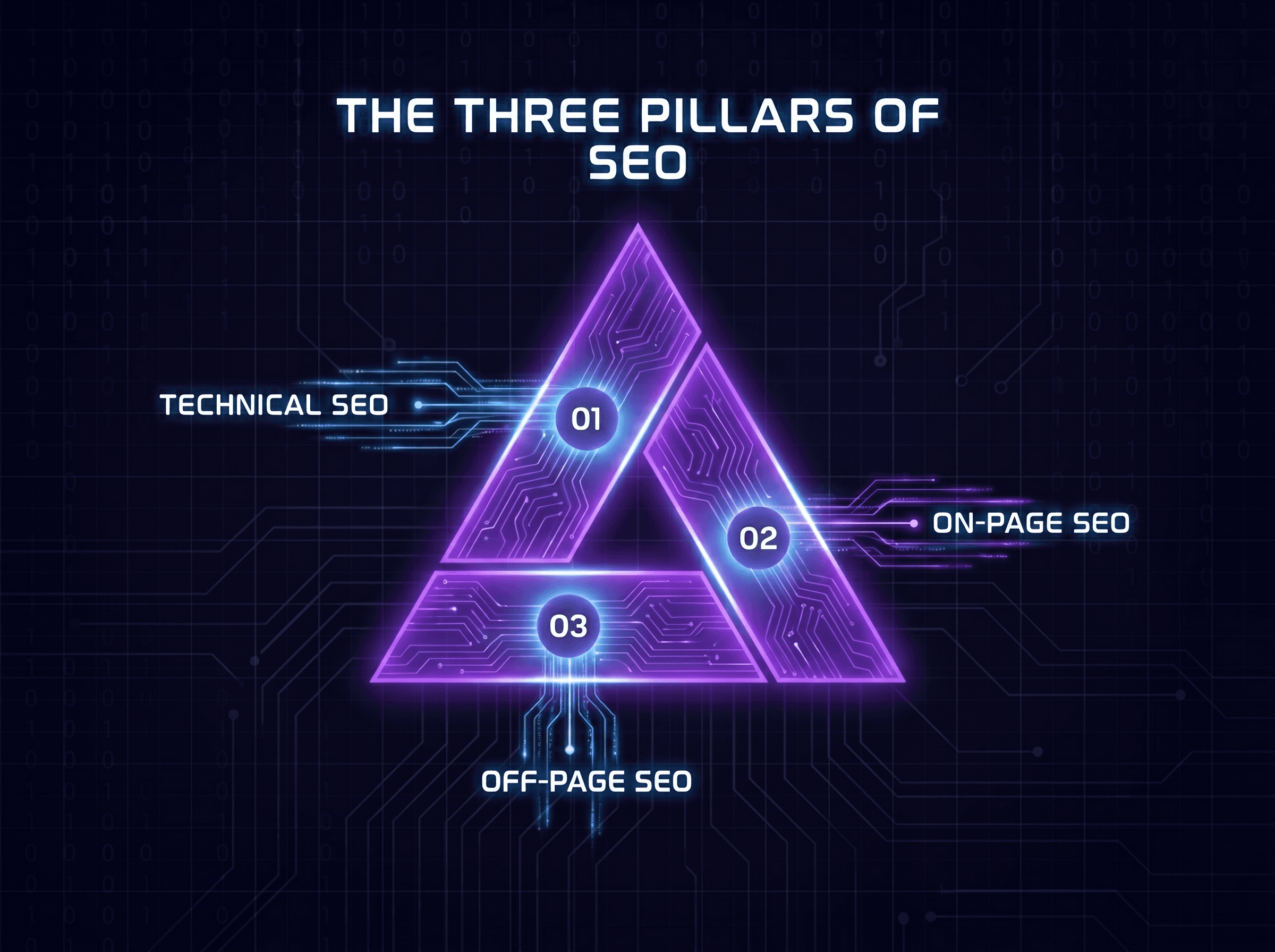
All SEO breaks down into three big areas. Get these right and you are ahead of most websites on the internet.
Pillar 1: On-Page SEO
On-page SEO is everything you do ON your actual website pages. This is where most beginners start, because you have full control over it.
Keywords
A keyword is the word or phrase someone types into Google. Your job is to figure out what words your customers use when they search, and then use those words on your pages.
For example: if you sell handmade dog collars, people might search "handmade leather dog collar" or "custom dog collar." Those are your keywords. You should use them in your page titles, your headings, and throughout your text.
But here is the catch: do not stuff keywords everywhere like a robot wrote your page. Google is smart enough to know when you are doing that. Write for humans first. Google will figure out the rest.
Page Titles and Headings
Your page title is the blue clickable text people see in Google results. It is one of the most powerful things you can control. Put your main keyword in the title. Keep it under 60 characters so it does not get cut off.
Headings (the big text that breaks up your page) help Google understand your page's structure. Use them like a book outline. One main heading (H1) at the top, then smaller headings (H2s, H3s) for each section.
Meta Descriptions
The short paragraph under the blue title in search results? That is the meta description. Google does not use it to decide your ranking, but real humans use it to decide whether to click. Make it interesting. Include your keyword. Keep it under 160 characters.
URL Structure
Your URL should be readable by a human. Compare these two:
yoursite.com/p?id=4892(bad)yoursite.com/handmade-leather-dog-collar(good)
Clean URLs with your keyword in them help both Google and people understand what the page is about before they even click.
Image Alt Text
Google cannot see images. It reads text descriptions you write for each image. These are called alt text. Describe what is in the image and sneak in a keyword when it makes sense. This also helps people who use screen readers, which is a nice bonus.
Pillar 2: Technical SEO
Technical SEO is the behind-the-scenes stuff that makes your website easy for Google to crawl and index. If this is broken, nothing else you do will matter much.
Site Speed
Slow websites lose. Full stop. If your page takes more than three seconds to load, a huge chunk of visitors will leave before they even see your content. And Google knows this, so slow sites rank lower.
Go to Google's free PageSpeed Insights tool. Type in your URL. It will tell you exactly what is slowing you down and how to fix it.
Mobile-Friendliness
More than half of all web traffic comes from phones. Google uses your mobile site to determine your ranking. If your website looks terrible on a phone, your rankings will suffer everywhere, including on desktop.
Test your site on actual phones, not just a resized browser window. Real testing catches real problems.
HTTPS
See that little padlock icon in your browser? That means a site is secure. If your website still starts with HTTP instead of HTTPS, fix this immediately. Google considers it a trust signal. Users do too. Many browsers now warn visitors that non-HTTPS sites are "not secure," which will send them running.
Sitemaps
A sitemap is like a map of your website that you hand to Google. It lists all your important pages so crawlers can find them easily. Most website platforms (WordPress, Squarespace, Shopify) can generate one automatically. Once you have one, submit it to Google Search Console.
No Broken Links
Broken links are links that go nowhere. They frustrate users and confuse crawlers. Use a free tool like Screaming Frog or Ahrefs Webmaster Tools to find and fix broken links on your site.
Pillar 3: Off-Page SEO (Link Building)
This is where things get interesting and where most beginners give up too soon.
Off-page SEO is about building your website's reputation on the internet. And the main way you do that is through backlinks.
A backlink is when another website links to yours. Think of it like a vote of confidence. If 50 other websites link to your page about dog collars, Google takes that as a signal that your page must be pretty good.
But not all votes are equal. A link from a major news site is worth a hundred times more than a link from a random blog nobody reads.
How do you get backlinks?
Write content people want to link to. This is the big one. Research-heavy articles, original data, how-to guides, and tool pages get links naturally because other writers use them as sources.
Guest posting. Write a helpful article for someone else's website in your industry. They publish it, and you get a link back to your site.
Get listed in directories. For local businesses, getting listed on Yelp, TripAdvisor, or your local Chamber of Commerce website are easy wins.
Podcasts. A lot of SEO experts on Reddit swear by this one and it is criminally underused. Get on a podcast as a guest. They will almost always link to you in the show notes. Way easier than writing guest posts.
The Four Types of SEO (Quick Version)
You will hear these terms thrown around. Here is what they mean:
Local SEO: Getting found by people near you. If you have a physical business location, this matters enormously. Claim your Google Business Profile (it is free). Keep your name, address, and phone number exactly the same everywhere on the internet. Collect reviews from happy customers.
Technical SEO: The behind-the-scenes stuff we covered above. Speed, mobile, HTTPS, structure.
On-Page SEO: The stuff on your actual pages. Keywords, titles, content quality.
Off-Page SEO: Building your reputation through backlinks and mentions across the web.
You need all four. Fix one and ignore the others? You will see limited results. Nail all four and you start winning.
E-E-A-T: Google's Secret Checklist
Google has a set of guidelines it uses to judge whether a website is trustworthy. It is called E-E-A-T.
Experience: Has the person who wrote this actually done the thing they are writing about?
Expertise: Does this person actually know their stuff?
Authoritativeness: Do other respected sources trust and reference this website?
Trustworthiness: Is this website honest, secure, and transparent?
This is why a page written by an actual doctor ranks higher than a random blog about health tips. Google is trying to protect people from bad information.
Practical way to improve your E-E-A-T: Add a real author bio to your content. Include credentials. Link to credible sources. Make sure your About page is clear and honest. Get mentioned by websites in your industry.
Keyword Research: How to Actually Do It
Keyword research is finding out what words your customers use when they search. This step comes before you write a single word of content.
Here is a simple process that works:
Start with what you know. Write down 5-10 topics your business covers. If you run a gym, that might be: weight loss, muscle building, beginner workouts, healthy eating, gym equipment.
Use free tools to expand your list.
Google Autocomplete: Start typing your topic into Google and see what it suggests. Those suggestions are real searches real people are making.
Google's "People Also Ask" box: Scroll down a Google results page and you will see a box of related questions. These are gold. Write articles that answer them.
Google Search Console (free): If your site has been around a while, this tool shows you what searches are already bringing people to your site. Often you are ranking for things you did not even try for. Find those and lean into them.
Ubersuggest (free tier): Type in a topic and get keyword ideas with search volume.
Find the sweet spot. You want keywords with decent search volume but not impossible competition. As a new or small website, you will not outrank Wikipedia or Amazon for broad terms. Go after "long-tail keywords," which are longer and more specific phrases.
Instead of trying to rank for "pizza" (impossible), try "best wood-fired pizza delivery in Denver" (way more possible).
Content: The Engine That Powers Everything
All roads in SEO lead back to content. Without something useful on your pages, there is nothing for Google to rank.
But here is where most people go wrong: they write what they WANT to say instead of what their audience is SEARCHING for.
Good content starts with a keyword and a question. What is someone searching for? What do they actually need to know? Answer that question better than anyone else on the first page of Google.
A few rules that actually work in 2025:
Cover the topic completely. Google wants to send people to a page that answers their question fully. If someone has to go back to Google and search again right after reading your page, that is a bad sign.
Write like a human, not a robot. Short sentences. Simple words. Paragraphs that are two or three sentences long. If you can replace a big word with a small word, do it.
Update old content regularly. A post you wrote two years ago with outdated information hurts your credibility. Set a reminder every six months to revisit your top pages. Update stats, check links, add new information.
One page, one main topic. Do not try to cram ten subjects onto one page. Pick one topic, cover it well, and use internal links to point to your other pages for related topics.
Tools You Need (Most Are Free)
You do not need to spend money to get started with SEO. Here are the must-haves:
Google Search Console (free): Shows you which searches bring traffic to your site, which pages Google has indexed, and any technical errors. Set this up on day one. No exceptions.
Google Analytics (free): Shows you how many people visit your site, which pages they look at, how long they stay, and where they came from. Pair it with Search Console for the full picture.
Google PageSpeed Insights (free): Tests your site's speed and tells you exactly what to fix.
Ahrefs Webmaster Tools (free): Shows you what websites are linking to yours and spots technical issues.
Ubersuggest (free tier): Good enough keyword research tool for beginners.
Once you are more serious, paid tools like Ahrefs, SEMrush, or Moz give you much more data. But start free, learn the basics, then upgrade.
Common SEO Mistakes Beginners Make
These mistakes are incredibly common. Knowing them in advance saves you months of wasted effort.
Chasing keywords that are too competitive. Typing "best laptop" into a keyword tool and seeing 2 million monthly searches sounds exciting. Then you realize Apple, Amazon, and every major tech site is competing for it. You will never rank there. Find smaller, specific keywords you can actually win.
Ignoring page speed. People discover SEO and immediately start writing content. Then they wonder why nothing is working while their site takes 9 seconds to load. Fix your technical foundation first.
Expecting overnight results. This is the big one. SEO takes time. New websites often take 3 to 6 months before they start seeing meaningful traffic. This is normal. Do not quit after week three because you are not on page one yet.
Keyword stuffing. Writing your keyword 40 times on one page used to work in 2005. Today it gets your site penalized. Write naturally. One main keyword, a few related phrases, that is enough.
Buying cheap backlinks. You will see ads promising 1,000 backlinks for $10. These links come from spammy websites that Google already knows about. They will not help you. They might actively hurt you. Do not do it.
Writing for Google instead of people. Ironic, given that this whole article is about getting Google to rank your site. But Google's entire goal is to find content that humans love. Write for humans first. Google rewards that.
SEO in 2025: What's Actually New
SEO is not static. Google updates its algorithm hundreds of times per year. Here is what matters right now:
AI search is rising. Tools like ChatGPT, Google's AI Overviews, and Perplexity are changing how people find information. Sometimes the answer appears right on the search page without anyone clicking. This makes it even more important to be the cited source, not just a ranked link. How? Write authoritative, well-structured content that AI tools are likely to pull from.
E-E-A-T matters more than ever. Google is cracking down on generic AI-generated content that has no real experience or expertise behind it. If you are writing about something, show that you have actually done it. Real examples, real experience, real opinions.
Brand mentions count. When other websites mention your brand name even without linking to you, Google notices. Getting your brand into news stories, podcasts, and industry publications builds authority.
User experience is a ranking factor. Google tracks signals like how quickly people leave your page (bounce rate) and whether they go back to Google right after visiting (which means your page did not answer their question). Make your site fast, easy to read, and actually useful.
Your First Week SEO Action Plan
Stop reading and start doing. Here is what to do in your first seven days:
Day 1: Set up Google Search Console and submit your sitemap.
Day 2: Run your site through Google PageSpeed Insights. Fix the easiest issues first.
Day 3: Open Google on your phone. Is your website easy to use? If not, talk to your web developer or switch to a mobile-responsive theme.
Day 4: Check that your site has HTTPS. Look for the padlock in your browser.
Day 5: Do keyword research for your top 3 most important pages. Use Google Autocomplete and the "People Also Ask" section.
Day 6: Update the page title and meta description on those 3 pages to include your keywords.
Day 7: Read through your top 3 pages as if you are a customer who knows nothing about your business. Does it answer their questions? Is it easy to read? Fix anything that is not.
That is one week of real, actionable work. Do that before worrying about anything else.
The Bottom Line
SEO is not magic. It is not a trick. It is not a one-time thing you do and forget about.
It is the steady, consistent work of making your website more useful, more trustworthy, and easier for Google to understand.
Do that work long enough and search engines will reward you with free, steady traffic that does not disappear the moment you stop paying for ads.
Start with the basics. Fix your technical foundation. Write content that actually helps people. Build your reputation over time.
The websites winning on Google right now are not winning because of some secret hack. They are winning because they have been consistently doing the right things for a long time.
You can do the same thing. Start today.
Blogs
More Blogs
From keyword goldmines to AI-driven content hacks—expert insights to help your blog posts dominate the first page.


