Top 20 Free SEO Tools to Boost Your Website Rankings in 2026
Introduction
Search engine optimization remains one of the most cost-effective digital marketing strategies, but many businesses assume they need expensive software to compete. The truth is, some of the most powerful SEO analysis tools are completely free and rival premium alternatives in functionality.
Whether you're a startup founder managing your own marketing, a content creator building your personal brand, or a small business owner looking to increase organic traffic, this comprehensive guide covers the 20 best free SEO tools available today. You'll discover how to conduct keyword research, analyze your competitors, audit your website's technical health, track your rankings, and optimize your content all without spending a dollar.
These aren't limited trial versions or watered-down freemium products. Each tool on this list offers substantial value in its free tier, providing actionable insights you can implement immediately to improve your search visibility.

1. Google Search Console: The Foundation of SEO Monitoring
Google Search Console is an essential free SEO checker that every website owner must use. This official Google tool provides direct insights into how Google views your site, what queries bring users to your pages, and which technical issues might be preventing proper indexing.
Key Features
Real performance data showing impressions, clicks, and average position
Coverage reports identifying indexing errors and crawl issues
Mobile usability insights
Security issue alerts
Manual action notifications
The Performance report alone makes Search Console invaluable. You can identify which keywords are driving traffic, discover opportunities where you're ranking on page two (positions 11-20) and could improve with optimization, and understand your click-through rates compared to your position.
Best Used For: Understanding your current search performance, identifying technical SEO issues, and discovering content opportunities based on actual search queries.
2. Google Analytics 4: Understanding User Behavior
While primarily known as a web analytics platform, Google Analytics 4 is a powerful SEO performance tool. GA4 helps you understand what happens after users find your site through search engines.
Track organic traffic trends, identify your highest-performing landing pages, measure bounce rates and engagement metrics, and understand the conversion paths that lead from organic search to your business goals. The Acquisition reports specifically show how organic search compares to other traffic sources, while event tracking reveals which content keeps users engaged.
Best Used For: Measuring the business impact of your SEO efforts and understanding user behavior patterns.
3. Ubersuggest: Comprehensive Keyword Research Made Simple
Neil Patel's Ubersuggest offers one of the most generous free tiers among keyword research tools. You get daily search limits that reset every 24 hours, making it perfect for ongoing SEO work.
What You Get Free
Keyword suggestions with search volume data
Keyword difficulty scores
Top-ranking pages for any query
Basic backlink data
Site audit capabilities
Content ideas based on what's ranking
Enter any keyword, and Ubersuggest returns hundreds of variations, questions, prepositions, and comparisons people actually search for. The keyword difficulty metric helps you identify opportunities where you can realistically rank without massive authority.
Best Used For: Discovering long-tail keyword variations and understanding search volume for content planning.
4. AnswerThePublic: Visualizing Search Questions
AnswerThePublic transforms search data into visual maps of questions, prepositions, comparisons, and alphabetical variations. This free tool is exceptional for understanding search intent and planning content that directly answers user queries.
When you enter a seed keyword, you receive hundreds of question-based searches like "how to," "why does," "can you," and "what is." These questions reveal exactly what your target audience wants to know, making content creation strategic rather than guesswork.
The tool pulls from autocomplete data, meaning these are real searches people are conducting. This makes it invaluable for creating FAQ sections, developing blog topics, and understanding the language your audience uses.
Best Used For: Content ideation, understanding question-based searches, and planning comprehensive topic coverage.
5. Google Keyword Planner: The Original Keyword Tool
Originally designed for Google Ads, Keyword Planner remains one of the most accurate keyword research tools available. While it's free, you need a Google Ads account to access it (though you don't need to run any campaigns).
The data comes directly from Google, making search volume estimates more reliable than third-party tools. You can discover new keywords, see historical trends, understand seasonality, and evaluate competition levels for paid search (which often correlates with organic difficulty).
Best Used For: Accurate search volume data and discovering keyword opportunities with commercial intent.
6. Ahrefs Webmaster Tools: Professional SEO Analysis Free

Ahrefs offers a completely free version of their professional SEO software through Webmaster Tools. After verifying your website, you gain access to site audit tools that rival premium platforms.
Receive weekly site health scores, identify broken links and redirect chains, discover technical SEO issues, analyze your backlink profile, and track referring domains. The site audit crawls your entire website, providing a prioritized list of issues affecting your SEO performance.
Best Used For: Technical site audits and backlink analysis for websites you own.
7. Screaming Frog SEO Spider: Technical Audit Powerhouse
Screaming Frog's free version crawls up to 500 URLs, making it perfect for small to medium websites. This desktop application performs comprehensive technical audits, uncovering issues that harm search performance.
What It Finds
Broken links (404 errors)
Redirect chains
Duplicate content
Missing meta descriptions
Oversized images
Page speed issues
The crawl data exports to Excel, allowing you to share findings with developers or track fixes over time. For technical SEO professionals, this is an indispensable free tool that provides enterprise-level insights.
Best Used For: In-depth technical SEO audits and identifying crawlability issues.
8. MozBar: SEO Metrics While You Browse
MozBar is a browser extension that displays instant SEO metrics for any page you visit. See Domain Authority, Page Authority, backlink counts, and on-page elements without leaving your browser.
This instant access to SEO data transforms how you research competitors, evaluate link opportunities, and analyze search results. When you Google a keyword, MozBar overlays metrics directly on the search results, showing you the authority levels you're competing against.
Best Used For: Quick competitive analysis and evaluating link-building opportunities.
9. SEMrush Free Account: Limited but Valuable
SEMrush's free account provides 10 requests per day across various SEO tools. While limited, these daily searches offer significant value for ongoing SEO work.
Access domain overview data, keyword research capabilities, backlink analysis, and site audit features. The organic research tool reveals your competitors' top-performing keywords, while position tracking monitors your rankings for critical terms.
Best Used For: Competitive intelligence and strategic keyword research when used consistently.
10. PageSpeed Insights: Google's Speed Testing Tool
Page speed directly impacts rankings and user experience. PageSpeed Insights analyzes both mobile and desktop performance, providing specific recommendations to improve load times.
The tool measures Core Web Vitals Google's official performance metrics and assigns scores for Performance, Accessibility, Best Practices, and SEO. Each metric includes actionable suggestions with estimated time savings.
Best Used For: Identifying and fixing page speed issues that affect rankings and user experience.
11. GTmetrix: Detailed Performance Analysis
GTmetrix offers comprehensive page speed analysis with waterfall charts showing exactly how your page loads. The free tier provides detailed reports including performance scores, structure analysis, and specific optimization recommendations.
Track performance history over time, test from different geographic locations, and receive video playback of your page loading. The recommendations are developer-friendly, making it easy to communicate necessary fixes.
Best Used For: Detailed performance diagnostics and communicating speed issues to developers.

12. Yoast SEO: WordPress Optimization Plugin
For WordPress users, Yoast SEO is the most popular on-page optimization plugin. The free version provides content analysis, readability scoring, XML sitemap generation, and meta tag management.
As you write content, Yoast provides real-time feedback on keyword usage, heading structure, meta description optimization, and internal linking. While the advice is sometimes simplistic, it ensures you cover basic on-page SEO factors.
Best Used For: On-page SEO optimization for WordPress websites.
13. Google Trends: Understanding Search Momentum
Google Trends reveals whether interest in a topic is rising, falling, or seasonal. This free tool helps you make strategic decisions about content creation and keyword targeting.
Compare multiple keywords to see relative search interest, identify geographic variations in search behavior, and discover related queries gaining traction. The "trending now" feature highlights breaking topics with surging search volume.
Best Used For: Identifying trending topics, understanding seasonality, and validating long-term content investments.
14. Schema Markup Validator: Structured Data Testing
Structured data helps search engines understand your content and can enable rich results in search. Google's Schema Markup Validator (now Rich Results Test) verifies your implementation is error-free.
Test any URL or code snippet to ensure your schema markup is valid. The tool identifies errors, warnings, and valid items, showing exactly how Google interprets your structured data.
Best Used For: Validating structured data implementation and troubleshooting rich result eligibility.
15. Bing Webmaster Tools: Microsoft's Search Insights
While Google dominates search, Bing still drives significant traffic and its Webmaster Tools offer unique insights. The interface is more beginner-friendly than Google Search Console, and some features are more generous.
Access SEO reports, site scan tools, keyword research, and backlink analysis. Bing's keyword research tool often reveals opportunities overlooked in Google-focused strategies.
Best Used For: Optimizing for Bing search and accessing alternative keyword research data.
16. Rank Math: Advanced WordPress SEO Plugin
Rank Math competes directly with Yoast but offers more features in its free version. Get advanced schema markup options, local SEO features, redirections manager, and detailed analytics.
The setup wizard optimizes fundamental settings in minutes, while the content analysis scores multiple focus keywords simultaneously. Built-in integration with Google Search Console brings performance data directly into WordPress.
Best Used For: Comprehensive WordPress SEO with advanced features free.
17. LinkMiner: Finding Broken Link Opportunities
LinkMiner by Mangools helps you find broken links on any website a classic link-building strategy. The free version provides limited daily searches but substantial value for each check.
Enter a competitor's domain, and LinkMiner identifies broken outbound links. You can then create content to replace those dead resources and reach out to the linking site, offering your content as a replacement.
Best Used For: Identifying broken link building opportunities on competitor sites.
18. Hunter.io: Finding Contact Emails for Outreach
SEO often requires outreach for link building, guest posting, or collaboration. Hunter.io's free tier finds email addresses associated with any domain, making it easier to connect with website owners.
The domain search reveals publicly available email addresses and patterns, while the email verifier checks if addresses are valid. This saves hours of manual research when conducting outreach campaigns.
Best Used For: Finding contact information for link-building and partnership outreach.

19. Google My Business Insights: Local SEO Data
For local businesses, Google My Business provides free insights into how customers find and interact with your listing. Track profile views, search queries, photo views, and customer actions.
The data shows whether people found you through direct searches (branded) or discovery searches (non-branded), helping you understand your local SEO performance. Request reviews, post updates, and optimize your profile all through the free platform.
Best Used For: Local SEO optimization and tracking local search performance.
20. SERP Checker Tools: Understanding Your Competition
Several free SERP analysis tools let you examine search results without ranking yourself. Tools like SERP Robot, SEO Minion, and SERPWatcher's free features reveal what you're competing against for target keywords.
Analyze title tag patterns, content length, domain authority, and backlink profiles of top-ranking pages. This competitive intelligence guides your content strategy and helps set realistic expectations.
Best Used For: Competitive analysis and understanding what it takes to rank for target keywords.
Combining Free SEO Tools for Maximum Impact
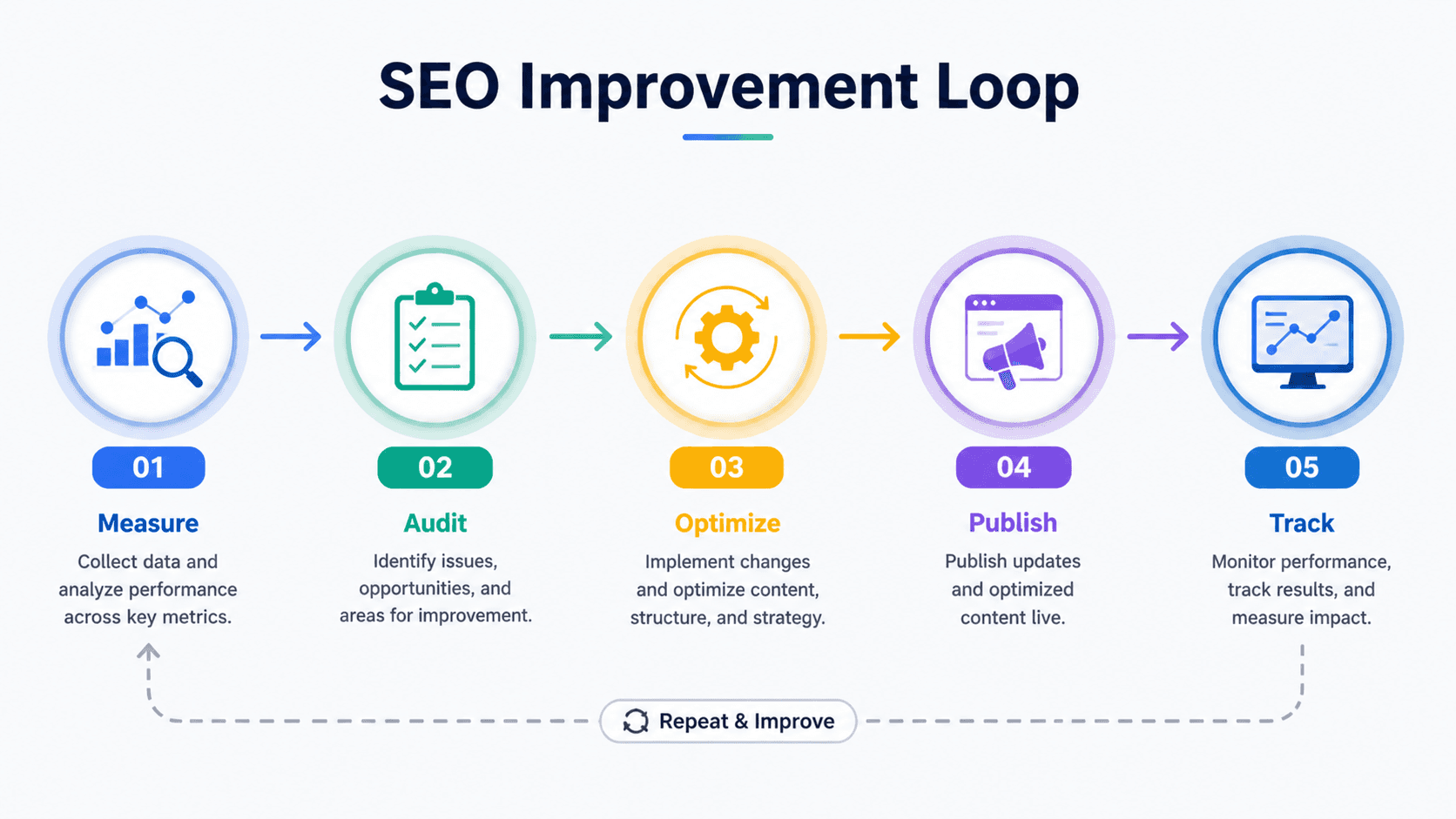
The real power emerges when you combine these free resources into a cohesive workflow:
For Keyword Research: Start with Google Keyword Planner for search volume, use Ubersuggest for variations, and validate trends with Google Trends.
For Technical SEO: Run Screaming Frog crawls monthly, monitor Search Console weekly, and test speed with PageSpeed Insights and GTmetrix.
For Content Optimization: Use AnswerThePublic for topics, Yoast or Rank Math during writing, and validate with Search Console performance data.
For Link Building: Find opportunities with LinkMiner, analyze competitor backlinks with Ahrefs Webmaster Tools, and use Hunter.io for outreach.
This integrated approach provides comprehensive SEO capabilities without premium software costs.
Limitations to Consider
Free SEO tools have constraints compared to paid alternatives. Daily search limits, restricted historical data, limited competitor analysis, and basic reporting features are common trade-offs.
For agencies managing multiple clients or large enterprises with thousands of pages, investing in premium tools becomes necessary. However, for small businesses, startups, and individual content creators, these free resources provide everything needed to compete effectively.
Frequently Asked Questions
Are free SEO tools as accurate as paid ones? Free SEO tools, especially those from Google like Search Console and Analytics, provide highly accurate data since it comes directly from the source. Third-party free tools may have smaller databases than premium versions but still offer valuable insights for most users.
Can I rank on Google using only free SEO tools? Absolutely. Many successful websites rank competitively using only free SEO software. The limitation is usually time and scale rather than capability. Free tools require more manual work but provide all the essential data needed for effective optimization.
Which free SEO tool is best for beginners? Google Search Console is the essential starting point for beginners. It's directly from Google, relatively simple to understand, and provides the most critical data about your website's search performance without overwhelming complexity.
Do I need to use all 20 free SEO tools? No. Start with Google Search Console, Google Analytics, and one keyword research tool like Ubersuggest. Add other tools as you identify specific needs like technical audits, competitor analysis, or local SEO optimization.
How often should I use these free SEO analysis tools? Check Google Search Console weekly, run technical audits monthly, and conduct keyword research as needed for new content. Analytics should be monitored regularly to understand traffic patterns and identify opportunities.
Are there any risks to using free SEO tools? The main risk is data privacy with lesser-known tools. Stick to established platforms from reputable companies. Also be aware that some free tools may have usage limits that could interrupt your workflow during critical projects.
Conclusion
Free SEO tools have evolved dramatically, offering capabilities that once required expensive enterprise software. By strategically combining Google Search Console, Google Analytics, Ubersuggest, Screaming Frog, and other tools on this list, you can execute comprehensive SEO strategies without subscription fees.
The key is understanding each tool's strengths and building a workflow that leverages their combined capabilities. Start with the essentials Search Console and Analytics then gradually incorporate specialized tools as your SEO knowledge grows.
Remember that tools provide data and insights, but strategy and execution determine results. Even the most expensive SEO software won't rank your site without quality content, proper technical implementation, and genuine value for users. These free resources give you everything needed to identify opportunities, fix issues, and track progress the rest depends on your commitment to applying these insights consistently.
Begin with one or two tools from this list today, master their features, then expand your toolkit as your SEO skills develop. The investment of time learning these free platforms will pay dividends in organic traffic and search visibility for years to come.
Blogs
More Blogs
From keyword goldmines to AI-driven content hacks—expert insights to help your blog posts dominate the first page.


