
The SEO Periodic Table: 31 Things That Actually Affect Your Rankings (Explained Simply)
SEO can feel like a giant pile of confusing advice. Add keywords. Don't add too many keywords. Get backlinks. But not THOSE backlinks. Make your site fast. Make it secure. Write more content. No wait, write BETTER content.
It's a lot.
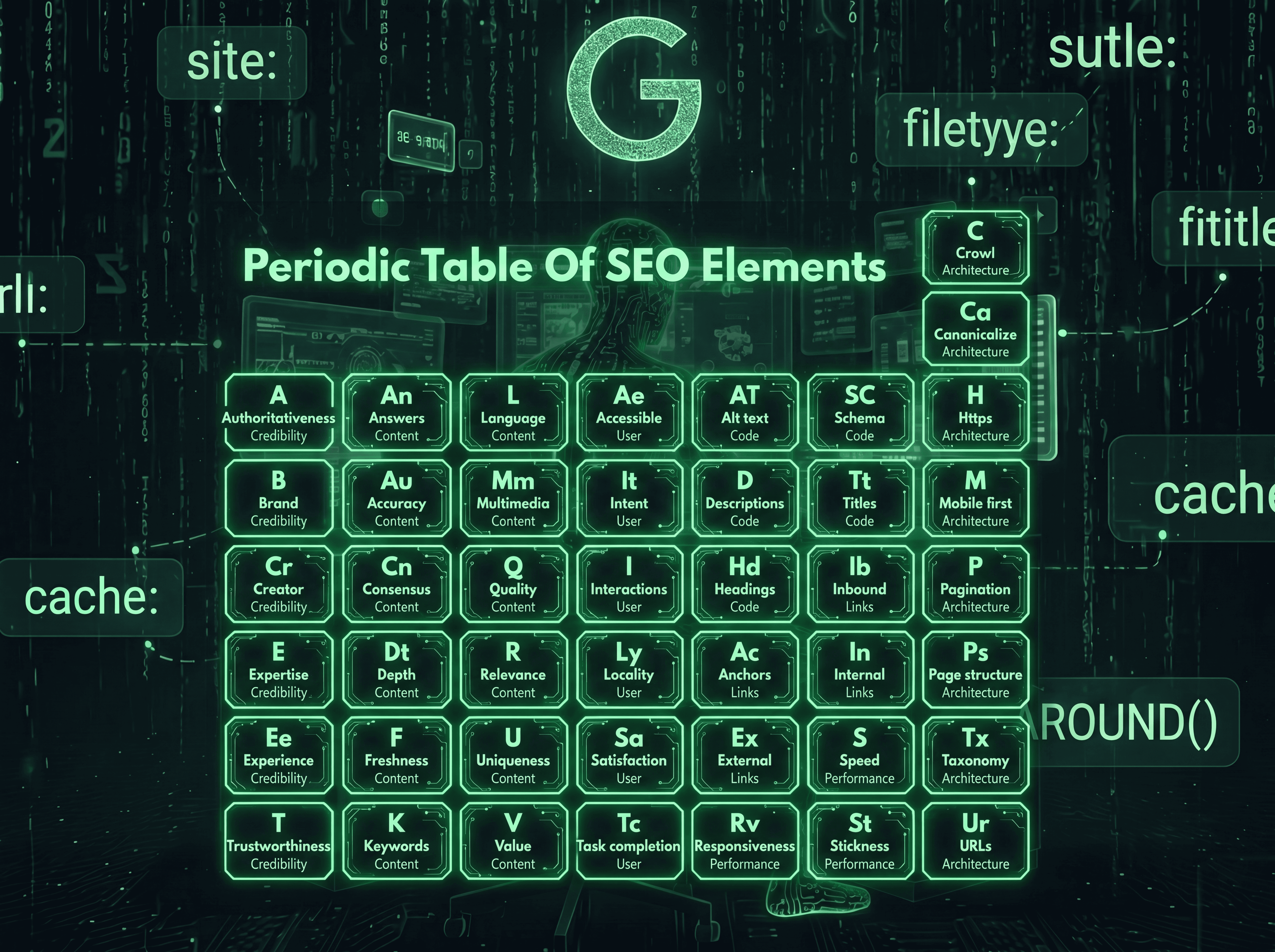
Years ago, some smart people in the SEO world had a clever idea. What if we organized all this stuff the way scientists organize chemical elements? Group similar things together. Give each one a short code. Make the whole messy subject easier to look at, all at once.
That idea became something called the "SEO Periodic Table." It's been updated several times over the years as SEO has changed. This article breaks down the most current version in plain English, with practical tips for each piece, so you walk away knowing exactly what to focus on.
The Big Idea: Why Group SEO This Way?
Here's the most important thing to understand before we dive in. There's no single "magic" factor that controls your rankings. Google uses hundreds of signals, and nobody outside Google knows exactly how they're all weighted.
But over years of testing, watching, and comparing notes (a lot of this comes from real-world experiments shared in SEO communities and forums), patterns emerge. Certain things consistently matter. This periodic table groups those things into seven buckets:
Content — what you actually publish
Architecture — how your site is built and organized
Code — the technical bits search engines read
Credibility — how trustworthy you and your site appear
Links — connections to and from your site
User — the actual experience real people have
Performance — how well your pages run
Think of it like checking a car before a road trip. You don't just check the engine. You check the tires, the brakes, the lights, the gas, the oil. Ignore any one of these and you might still drive, but you're asking for trouble. SEO works the same way. No single piece guarantees success, but neglecting any piece can quietly hold you back.
Let's go through each group.
Group 1: Content (What You Actually Publish)
This is the heart of SEO. Without content, there's nothing for search engines to show anyone. But not all content is created equal.
Quality. Your content needs to be genuinely helpful and well-written, with no typos or sloppy mistakes. Simple as that sounds, it's the foundation everything else builds on.
Keywords. You need to know the actual words your audience uses, then weave those words naturally into your content. Here's the key word: naturally. Repeating "best running shoes" fifteen times in one article doesn't help anymore, and can actually hurt you. Write like a human talking to another human.
Freshness. For topics that change over time, like prices, statistics, or trends, keeping your content updated matters. For topics that don't change much, like "how to tie a tie," freshness matters less. Know which type of content you're creating.
Relevance. Does your page actually deliver what someone searching for that topic wants? If someone searches "how to fix a leaky faucet" and your page is mostly about faucet history with one line about fixing leaks, that's a relevance mismatch.
Accuracy. Don't promise something in your headline that your content doesn't deliver. If your title says "5 Ways to Save $1000 on Groceries" but your article only gives vague tips like "buy generic brands," people feel tricked. Google notices when people bounce away frustrated too.
Depth. Forget chasing a specific word count. Depth means actually covering a topic thoroughly. Sometimes that's 500 words. Sometimes it's 3,000. The goal is substance, not padding.
Uniqueness. What does YOUR content offer that the other ten articles on page one don't? This could be your own data, your own experience, a different angle, or information nobody else bothered to include.
Answers. People search because they have questions. Does your content clearly answer the questions people are actually asking? A practical tip here: search your topic and look at the "People Also Ask" boxes Google shows. Those are real questions real people ask. Answer them directly.
Multimedia. Images, videos, and audio aren't just decoration. They can help explain things words can't, keep people engaged longer, and even show up in image or video search results separately.
Language. This one's simple but often overlooked. If your audience speaks English, write in English. If you're targeting a specific country or region, match the language and dialect they actually use.
Consensus. For certain topics, especially ones involving facts, health, or safety, your content should generally align with what other credible sources say. This doesn't mean copying everyone else. It means not contradicting well-established facts without very strong evidence.
Value. Before publishing anything, ask yourself: why does this page need to exist? If the honest answer is "to rank in Google," that's a red flag. The honest answer should be "because it helps someone do or understand something."
Group 2: Architecture (How Your Site Is Built)
Think of architecture as the blueprint of your house. You can have beautiful furniture (great content), but if the hallways don't connect to the rooms properly, people get lost.
Crawl. Search engines need to be able to access and fully read your pages. If your site has technical issues that block crawlers, or if important pages are buried so deep that nothing links to them, they might never get found at all.
Taxonomy. This is just a fancy word for organization. How are your topics and pages connected to each other? A well-organized site groups related content together and links between related pages, helping both visitors and search engines understand what your site is really about.
Page structure. Every page typically has three parts: the main content, supporting content (like related links or author bios), and ads or promotions. These should be clearly separated so visitors (and search engines) can tell what's the actual point of the page versus what's extra.
Mobile-first. Here's the deal. Most searches happen on phones, and search engines primarily evaluate the mobile version of your site. If your site looks great on a desktop computer but is a mess on a phone, that mess is what matters most.
URLs. Keep your web addresses simple and descriptive. A URL like yoursite.com/blog/post?id=4729&cat=12 tells nobody anything. A URL like yoursite.com/how-to-fix-a-leaky-faucet tells everyone exactly what the page is about, just by reading it.
Canonicalize. Sometimes the same content can be accessed through multiple URLs by accident. This confuses search engines about which version is the "real" one. Canonical tags and proper redirects fix this by pointing to one preferred version.
Pagination. If you have content that spans multiple pages, like a long article split into parts or a product list with hundreds of items, handle it thoughtfully so search engines understand how the pieces connect.
HTTPS. Your site should be secure. This is the little padlock icon you see in your browser's address bar. It's been a baseline expectation for years now, not a bonus.
Group 3: Code (The Technical Stuff Behind the Scenes)
You don't need to be a programmer to understand this group. Think of it as the labels and tags that help search engines understand what they're looking at.
Titles. This is the clickable headline that shows up in search results. It needs to be descriptive enough that someone knows what they'll get, and compelling enough that they actually want to click.
Descriptions. This is the short summary text that often appears under your title in search results. It doesn't directly boost rankings, but a good one can mean the difference between someone clicking your result or scrolling past it.
Headings. These are the bold section titles that break up your content (like the ones in this very article). Good headings help readers scan your content quickly and help search engines understand how your content is organized.
Alt text (image descriptions). This is a short text description attached to images, originally meant for accessibility (so people using screen readers know what an image shows). It also helps your images show up in image search results.
Schema (structured data). This is a bit of behind-the-scenes code that explicitly tells search engines "this is a recipe" or "this is a product with this price" or "this is a review." It helps your content qualify for special, eye-catching displays in search results, like star ratings or recipe cards.
Group 4: Credibility (Can People Trust You?)
This whole group comes from a concept Google uses called E-E-A-T, which stands for Experience, Expertise, Authoritativeness, and Trustworthiness. None of these are things you can directly "install" on your website. They're built over time, through real actions.
Trustworthiness. Across your entire site, are you accurate, honest, and reliable? This includes things like having clear contact information, being transparent about who you are, and not publishing misleading information.
Experience. Does the person creating this content actually have real, hands-on experience with the topic? A review of a hiking trail written by someone who's actually hiked it reads very differently than one written by someone who just researched it online.
Expertise. Does the content show real depth of knowledge? This matters even more for topics where bad information could genuinely hurt someone, like health, finance, or legal topics.
Authoritativeness. This is about reputation. Are you someone (or some business) that other credible sources point to as a go-to resource on this topic? This builds up through mentions, links, and recognition over time.
Brand. This covers everything that makes your brand recognizable and consistent: your name, logo, colors, the way you talk, and how people describe you when they mention you elsewhere.
Creator. For content with a named author, things like that person's background, experience, and credentials contribute to how trustworthy the content feels. A health article written by "Staff Writer" feels different than one written by "Dr. Jane Smith, board-certified cardiologist with 15 years of practice."
Group 5: Links (Connections In and Out)
Links used to be THE big factor in SEO. They're still important, but the conversation around them has matured a lot.
Inbound links (backlinks). These are links from other websites pointing to yours. The old advice was simply "get more links." The current reality is more nuanced: you want links from relevant, trustworthy sites, ideally because they genuinely found your content valuable enough to reference, not because you paid for placement or traded favors.
Internal links. These are links between pages on your own site. They help visitors navigate, help search engines understand which pages you consider important, and help spread "authority" from your strongest pages to newer or less-visible ones.
External links. These are links FROM your content TO other websites. Counterintuitively, linking out to genuinely useful, credible sources can help your content. It signals you've done your research and aren't trying to keep visitors trapped on your site at all costs.
Anchor text. This is the actual clickable text of a link. "Click here" tells nobody anything. "our guide to fixing leaky faucets" tells both readers and search engines exactly what they'll find on the other end.
Group 6: User (The Human Experience)
This entire group exists because of one simple idea: search engines want to send people somewhere that actually helps them, because that keeps people using search engines.
Accessible. Can people with disabilities use your site? This includes things like proper text sizing, color contrast, keyboard navigation, and screen-reader compatibility. This isn't just a "nice to have," it's about not excluding part of your potential audience.
Intent. This is about understanding the real reason behind a search. Someone searching "coffee maker" might want to buy one, learn how to use one, fix one, or compare brands. Matching your content to the actual intent behind a search matters more than just matching the words.
Interactions. Search engines pay attention to how people behave after clicking a result. Do they stick around, or immediately hit the back button? Do they click around your site, or leave right away? While the exact details of how this is measured aren't public, the underlying idea is simple: content that satisfies people tends to perform better over time.
Locality. If your business or content is relevant to a specific place, country, region, city, or neighborhood, make that connection clear and authentic. Generic content that could apply anywhere misses opportunities to connect with local searchers.
Satisfaction. Did the page fully meet what the person was looking for, to the point where they don't feel the need to go check a competitor's page too?
Task completion. Beyond just reading information, can people actually DO the thing they came to do? If your page explains how to do something but the actual tool, form, or next step is buried or broken, you're failing this one even if the content itself is great.
Group 7: Performance (How Well Your Pages Actually Run)
This group is less about rankings directly and more about not frustrating people once they arrive.
Speed. How quickly does your page load? Slow pages frustrate people, and frustrated people leave. They might also be less likely to come back.
Responsiveness. When someone clicks a button or interacts with something on your page, how quickly does the page respond? A page that "freezes" for a second or two after every tap feels broken, even if it technically works.
Visual stability. Have you ever tried to tap a button on your phone, only for an ad to load at the last second and you accidentally tap THAT instead? That's a visual stability problem. Content shifting around while a page loads is annoying and can lead to accidental clicks.
How to Actually Use This (Without Losing Your Mind)
Okay, that's 31 different things. Nobody can fix all of these at once, and honestly, you don't need to.
Here's a practical approach:
Step 1: Pick your weakest group. Be honest with yourself. Most websites have one or two groups that are clearly behind the others. Maybe your content is great but your site is painfully slow. Maybe your technical setup is solid but you've never thought about credibility at all.
Step 2: Pick the 2-3 elements within that group that feel most "fixable" right now. You don't need a massive overhaul. If your Performance group is weak, maybe start with image compression to improve speed, something a lot of site owners can do themselves with free tools.
Step 3: Fix those, then reassess. SEO isn't a "set it and forget it" task. After making changes, give it some time (these things don't show results overnight), then look at your weakest areas again.
Step 4: Remember that everything is connected. Improving one area often quietly helps others. Better content (Content group) tends to attract more natural links (Links group) and keep people on the page longer (User group), which can improve how search engines view your overall site.
A Few Practical Combos Worth Knowing

Some of these elements work especially well together. Here are a few combos worth paying attention to:
Headings + Answers + Schema. If you write clear headings that match real questions people ask, write direct answers right after those headings, and add the right structured data (like FAQ schema), you're stacking three elements that all reinforce each other. This combo is often behind those expandable "question and answer" boxes you see in search results.
Speed + Visual Stability + Mobile-first. These three performance-related elements are especially connected on mobile devices, where slow connections and small screens make problems way more noticeable. Fixing one often involves touching the others.
Internal Links + Taxonomy. A well-organized site (taxonomy) makes it natural to add helpful internal links, because related content is easy to find and connect. A messy site makes internal linking feel like an afterthought, because nobody, including you, can easily find what else exists on the site.
Experience + Creator + Trustworthiness. For any content where expertise really matters (health, money, legal, safety), having a real named expert with real credentials write or review the content touches all three of these credibility elements at once.
The Bottom Line
SEO isn't one trick or one secret factor. It's dozens of smaller things, grouped into a handful of big categories, all working together.
You don't need to be perfect at all 31 elements. But you do need to know they exist, understand roughly what each one means, and avoid completely ignoring any single group for too long.
Think of this list less like a checklist to complete once, and more like a dashboard to revisit periodically. Every few months, scan through the groups. Ask yourself honestly: which area have we been neglecting? Then go fix that one thing. Repeat. That's really all SEO is, repeated honest check-ins, paired with steady, practical improvements over time.
Blogs
More Blogs
From keyword goldmines to AI-driven content hacks—expert insights to help your blog posts dominate the first page.


