Creating a content calendar is about way more than just plugging dates into a spreadsheet. It’s a strategic process that involves setting clear goals, auditing what you’ve already got, picking the right tool for your team, and scheduling posts around themes that actually matter to your business. This simple shift can take you from random acts of content to a structured plan that gets your whole team on the same page and delivers real results.
Why a Content Calendar Is Your Secret Weapon
Let’s be real for a second. Content creation often feels like pure chaos. One week you're brimming with brilliant ideas, the next you're staring at a blank screen, desperately trying to cook up a last-minute social media post.
A content calendar is the strategic backbone that tames this chaos. It’s not just another organizational tool; it becomes the single source of truth for your entire marketing story.
Think of it like a roadmap for a long journey. Without it, you're just driving in the dark, hoping you end up somewhere good. With a calendar, you can see the entire trip laid out, plan your key stops, and anticipate the twists and turns ahead. This kind of foresight is what builds momentum and lets you tell a consistent, compelling story across all your channels.
The Strategic Advantages of Planning Ahead
A well-crafted calendar forces you to operate strategically, not reactively. It helps your team move from the frantic "What should we post today?" mindset to the focused, "How does this piece of content support our quarterly goals?" This shift is absolutely fundamental to achieving any kind of sustainable growth.
Here are some of the biggest wins:
Team Alignment: Everyone—from writers and designers to social media managers—knows what’s coming up, what’s needed from them, and when. This simple clarity eliminates frustrating bottlenecks and those endless "just checking in" email chains.
Brand Consistency: Your calendar is your guardrail. It ensures your tone, messaging, and visual identity stay consistent whether you're publishing a blog post, a tweet, or an email newsletter.
Gap Identification: When you have a bird's-eye view of your content, the holes in your strategy become glaringly obvious. You might suddenly realize you haven't published a customer case study in six months or that you've completely neglected a key topic cluster. A calendar lets you spot these gaps and fill them proactively.
A content calendar isn't about killing creativity. It’s about building a framework where creativity can actually flourish. By taking care of the logistical heavy lifting, it frees up your team to do what they do best: create content that makes an impact.
More Than Just a Schedule
At the end of the day, a content calendar is a commitment to intentionality and quality. It’s the key difference between a brand that’s just shouting into the void and one that’s building a meaningful, ongoing conversation with its audience.
The industry gets it. The global market for marketing calendar software was valued at a massive USD 12.5 billion in 2025 and is on track to hit USD 32.4 billion by 2035. You can dig into the complete market forecast for marketing calendar tools on Research Nester.
When you plan ahead, you can thoughtfully weave together different content formats—from in-depth articles to quick-hitting social videos—ensuring every single piece supports the others. This interconnected ecosystem is what truly builds authority, drives SEO performance, and keeps your audience coming back for more.
Set Your Content Strategy Before You Plan
It’s tempting to jump right into a spreadsheet or a shiny new planning tool, but that’s like trying to build a house without a blueprint. A powerful content calendar isn't the starting line; it's the final output of a strategic process. It’s built on a solid foundation that connects every blog post, video, and tweet back to a meaningful business goal.
Before you even think about dates and deadlines, you need to answer a few big questions. What are you actually trying to achieve? Is the goal to generate more qualified leads, build brand awareness in a new market, or maybe reduce customer churn with better educational content?
Your content calendar is simply the roadmap that guides you toward those objectives. For example, if your goal is to "increase lead generation by 20%," your strategy might involve a series of bottom-of-the-funnel blog posts, in-depth case studies, and a webinar—all of which need a home on your calendar.
Audit Your Existing Content First
Before you create anything new, take a look at what you already have. A thorough content audit can reveal hidden gems and highlight some pretty obvious gaps. You might find a high-performing blog post from two years ago that just needs a quick data refresh to be relevant again. That same post could then be repurposed into a snappy infographic and a series of social media clips.
This process isn't just about digging up old content; it's about understanding what truly resonates with your audience. As you review your assets, look for clear patterns in your best-performing pieces:
Top Topics: What subjects consistently bring in the most traffic and get people talking?
Winning Formats: Do your practical how-to guides outperform your opinion pieces? Do short-form videos get more shares than static images on your social channels?
Conversion Power: Which articles are actually generating sign-ups, demo requests, or sales?
A content audit isn't about judging past work. It's a data-gathering mission that provides the insights you need to make smarter decisions for your future content calendar.
Strategically reusing content is one of the most efficient things you can do. After all, 47% of marketers repurpose content to maximize their ROI. On the flip side, 34% admit they struggle with creating enough content regularly. A well-planned calendar helps you strike that perfect balance between quality and quantity.
Refine Who You Are Talking To
You can't create content that truly connects if you don't have a crystal-clear picture of who you're talking to. Vague audience personas like "small business owners" just won't cut it. You need to dig much deeper into their specific challenges, their goals, and the exact language they use to describe their problems.
What are their biggest pain points right now? What questions are they typing into Google at this very moment? Answering these questions helps you find the specific search terms people use. A great starting point is to dive deep into long-tail keyword research, which can uncover incredibly specific user needs. It's also smart to ensure your content efforts are aligned with your promotional channels by developing a comprehensive social media strategy before you get too far into calendar planning.
This level of audience understanding transforms your content calendar from a simple schedule into a customer-centric plan. Instead of brainstorming topics based on what you want to say, you'll be creating content that directly answers the questions your ideal customers are already asking. That’s the fundamental shift from just making content to creating resources that solve real-world problems.
Find the Right Content Calendar Tool for Your Team
Picking the right tool is a make-or-break moment for your content calendar. What works wonders for a solo blogger will absolutely hamstring a ten-person marketing team. The goal isn’t to find the "best" tool on the market, but the best tool for your team, your workflow, and your budget.
An awkward, clunky tool does more than just slow you down. It creates friction. It kills motivation. Before you know it, your beautifully planned calendar becomes a digital ghost town. Your tool needs to be a natural extension of your process, not a hurdle you have to jump over every day.
Simple Spreadsheets for Solo Creators
If you're a freelancer, a solopreneur, or a tiny team just getting started, don't overcomplicate things. A simple spreadsheet in Google Sheets or Excel is often the smartest first step. It's free, you can customize it endlessly, and there's basically no learning curve. You can have a functional calendar up and running in less than an hour.
Of course, that simplicity is also its biggest drawback. Spreadsheets don't have built-in automations, real-time collaboration gets messy fast, and they become a nightmare to manage once you're juggling multiple channels more than a few weeks out.
Best For: Individuals or pairs who just need a simple grid to track titles, publish dates, and status.
Key Strengths: No cost, total flexibility, and ridiculously easy to set up and share.
Potential Limitations: Lacks automation, terrible for managing visual assets, and scales very poorly as your content operation grows.
Project Management Tools for Growing Teams
Once your team starts to grow, you'll feel the limits of a spreadsheet very quickly. This is the point where project management tools like Trello, Asana, or monday.com become your new best friend. These platforms are built for collaboration and give you a much more dynamic way to see your content through its entire lifecycle.
You can create a "card" or "task" for each blog post or video and literally drag it through different stages—from "Ideation" to "Drafting," "In Review," and finally "Published." This visual, Kanban-style workflow gives everyone on the team instant clarity. Assigning owners, setting due dates, and attaching drafts are all built right in.
This screenshot shows a Trello board, a perfect example of how teams can use a visual project management tool for their content calendar.
Each card holds all the essential details—briefs, outlines, attachments, and conversations—keeping everything organized and accessible.
Shifting to a project management tool is about investing in your workflow. It introduces a level of accountability and structure that a spreadsheet just can't provide. It’s the perfect middle ground for teams that need more power but aren't ready for a hyper-specialized (and expensive) system.
Just keep in mind, while most of these tools have calendar views, their main job is task management, not content publishing. Integrations with other marketing software can also be limited unless you spring for a paid plan.
Specialized Platforms for Large-Scale Operations
For bigger companies or businesses where content is the main event, it’s time to look at specialized platforms like CoSchedule, Contently, or Percolate. These are the heavy hitters, built from the ground up specifically for marketing teams.
They do way more than just scheduling. They pull content creation, social media publishing, and performance analytics into one central command center. You'll often find features like:
Automated social media scheduling right from the calendar.
Integrated approval workflows to stop bottlenecks.
Content performance analytics to see what’s actually driving results.
Asset management to keep all your images and videos in one place.
This kind of all-in-one power comes with a bigger price tag, and these platforms can feel overly complex for small teams. But for a large operation managing multiple brands or complex campaigns, the efficiency you gain is huge. The demand for these tools is exploding; the global social media calendar tool market is projected to grow at a CAGR of about 12.5% between 2025 and 2031. This makes sense when you consider that 65.7% of the world's population was active on social media in 2025, juggling an average of 6.84 platforms each. You can dive deeper into the social media calendar market growth on Lucintel.
Content Calendar Tool Comparison
Choosing a tool can feel overwhelming, so I've put together this quick comparison table to help you match the right platform type to your team's reality.
Tool Type | Best For | Key Strengths | Potential Limitations |
|---|---|---|---|
Spreadsheets | Solo creators, freelancers, and very small teams. | Free, highly customizable, and no learning curve. | No automation, poor collaboration, doesn't scale. |
Project Mgmt. Tools | Small to mid-sized teams needing workflow visibility. | Great for collaboration, visual task tracking, accountability. | Primarily for tasks, not publishing; limited integrations. |
Specialized Platforms | Large teams and content-heavy organizations. | All-in-one hub, automation, analytics, and integrations. | Expensive, can be complex, potential feature bloat. |
Ultimately, the best choice comes from an honest look at your team's needs right now—and where you see yourself in six months. Start with the simplest solution that gets the job done, and don't be afraid to upgrade as your content engine starts to really rev up.
Build a Calendar That Actually Works
Alright, you've got your strategy and you've picked your tool. Now for the fun part: actually building the calendar. This is where all that high-level planning gets real. A great content calendar isn't just a list of titles and dates; it's the command center for your entire content operation, tracking everything from a raw idea to a published, high-performing asset.
The whole point is to create a single source of truth. Anyone on the team should be able to glance at it and know exactly what’s happening, without having to fire off a Slack message asking, "Hey, who's writing the Q3 case study?" or "Did we ever get the graphics for that webinar promo?"
The Must-Have Fields for Every Content Item
To make your calendar truly useful, you need to capture the right information for every single piece of content. Think of each entry as a mini-project brief. While your exact setup will depend on your tool, there are a few non-negotiable fields you'll want.
Here’s what I recommend tracking for everything you plan to create:
Content Title/Headline: A clear, working title.
Content Format: Is it a blog post, a YouTube video, an Instagram Reel, or a newsletter?
Current Status: This is the key to managing your workflow. Use simple, clear labels like 'Ideation,' 'Drafting,' 'In Review,' 'Scheduled,' and 'Published.'
Owner/Assignee: Who is the one person responsible for seeing this piece through to the finish line?
Publish Date: The day it’s scheduled to go live.
Primary Keyword: The main search term you're targeting with the piece. If you're wondering how to approach this, our guide on SEO and how many keywords per page is a great resource.
Call-to-Action (CTA): What do you want people to do after they read or watch? (e.g., "Download the eBook," "Book a Demo").
Distribution Channels: Where are you going to promote this once it's live? (e.g., LinkedIn, Twitter, Email Newsletter).
When you include these details, your calendar transforms from a simple schedule into a powerful management tool. Every piece of content starts with a clear purpose and a plan.
Use Pillars and Clusters to Structure Your Content
One of the most effective strategies I've seen for planning content is the content pillar and topic cluster model. It’s a smart way to organize your content around core themes, which is great for both SEO and for giving your audience a more cohesive experience.
A content pillar is a massive, comprehensive piece of content on a broad topic. You can then break it down into many smaller, related pieces, which are your topic clusters. Crucially, all these smaller pieces link back to the main pillar.
Let's say you're a SaaS company. You could create a pillar page on "Customer Retention Strategies." This would be your ultimate, in-depth guide.
From that one pillar, you could spin off an entire cluster of content:
A blog post on "5 Ways to Reduce Churn with Better Onboarding."
A short video explaining "How to Calculate Your Net Promoter Score (NPS)."
An Instagram carousel showcasing "Customer Success Stories."
A case study on how a client improved retention by 15%.
This model works so well because it builds your topical authority. You're essentially telling search engines that you are the expert on that subject. It also makes for a better user experience, letting visitors easily go deeper on the topics they care about.
As you start building out more sophisticated strategies like this, you'll find your tooling needs to evolve, too.
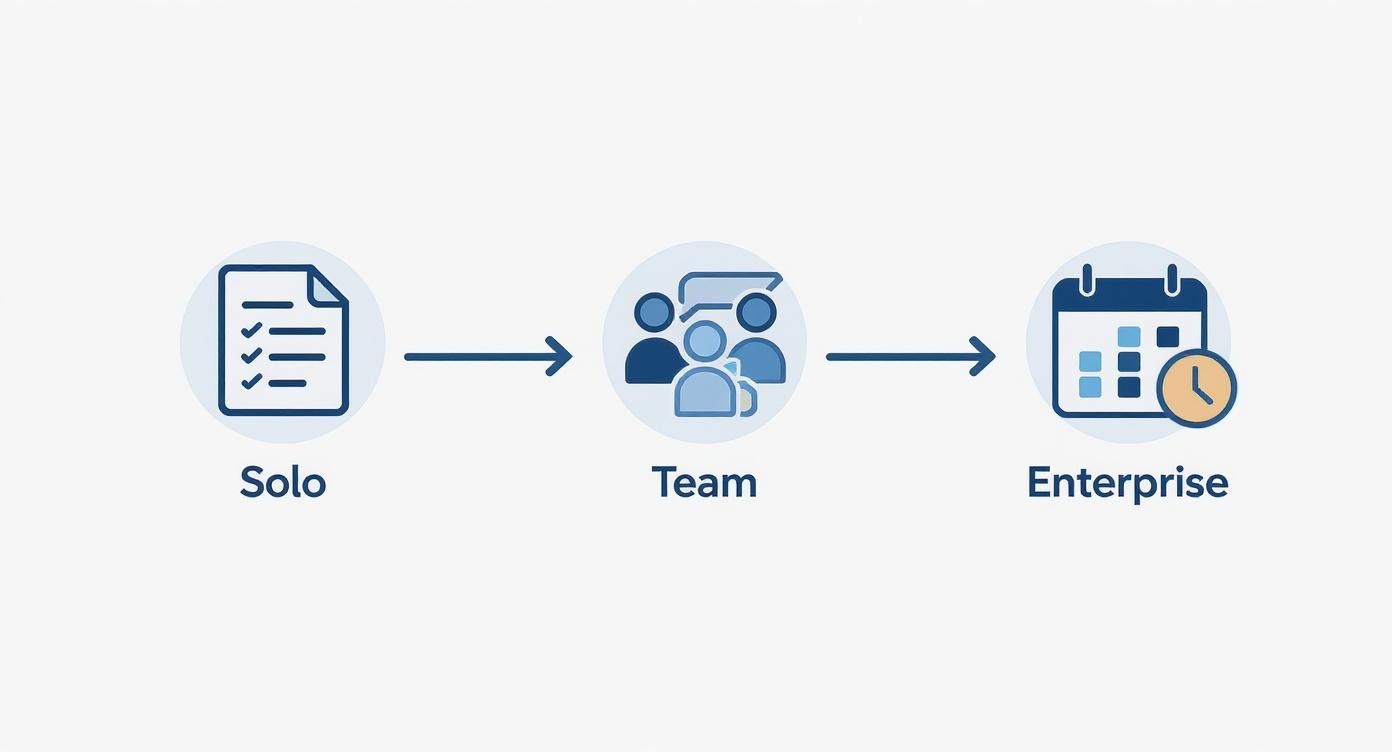
This progression makes perfect sense. As your content plans get more complex with pillars and clusters, you naturally need more robust tools to manage it all without chaos.
Map Out a Proven Content Workflow
Your calendar should also be a visual map of your content's journey. Having a clear, repeatable workflow saves a ton of time and headaches by making sure every piece moves smoothly from one stage to the next.
While the exact steps will be unique to your team, a standard workflow usually follows this path:
Ideation: This is the brainstorming stage. Ideas get dumped into a backlog in your calendar, often with just a title and a quick note.
Research & Outlining: An idea gets assigned to a creator who does the keyword research and builds a solid outline.
Content Creation (Drafting): The writer, designer, or videographer gets to work on the first draft.
Internal Review: The draft goes to an editor or subject matter expert for feedback.
Final Approval: A key stakeholder gives the final green light.
Scheduling & Promotion: The approved content is scheduled in your CMS, and promotional materials (social posts, email copy) are prepped.
Publishing & Distribution: The content goes live and the promotion plan kicks into gear.
By building these stages directly into your calendar—often using that "Status" field we talked about—you create a visual pipeline. Anyone can see where a piece of content is at any time, which helps spot bottlenecks and keeps the whole team in sync.
If you're focused specifically on professional networks, this detailed guide on how to create a LinkedIn content calendar offers some great, platform-specific workflow ideas. Ultimately, this level of organization is what separates a static to-do list from a high-performing content engine.
Keep Your Content Calendar Fresh and Effective
Your content calendar is not a static document you create once and forget about. Think of it as a living, breathing part of your strategy that needs regular attention to stay effective. A calendar full of stale ideas or topics that are no longer aligned with your goals is just as useless as having no calendar at all.
To really get the most out of your planning, you have to build a system for keeping it fresh, flexible, and in sync with what's happening in your market. It's less about creating a perfect, rigid schedule and more about developing a dynamic framework for content.
Uncovering an Endless Supply of Ideas
The fear of the "empty calendar" is real. I’ve been there. Staring at blank squares and feeling the pressure to dream up brilliant new topics can be paralyzing. But the secret isn't about waiting for a lightning bolt of inspiration. It’s about building reliable systems to generate ideas you can turn to anytime.
Instead of just brainstorming in a vacuum, you need to proactively look for ideas grounded in what your audience actually wants to know. Here are a few battle-tested methods I use to keep the idea pipeline full:
Talk to Your Frontline Teams: Your sales and customer support staff are sitting on a goldmine. They hear your customers' biggest frustrations and most frequent questions every single day. I find that setting up a quick monthly chat and asking them, "What questions are you tired of answering?" generates more high-value topics than hours of keyword research.
Analyze Competitor Gaps: Use an SEO tool like Ahrefs or Semrush to see what keywords your competitors are ranking for. But don't just copy their top pages. Look for the "low-hanging fruit"—topics where they rank, but with thin, outdated, or just plain bad content. That’s your opening to create something 10x better and steal their traffic.
Mine Online Communities: Where does your audience hang out? Find them on Reddit, Quora, LinkedIn Groups, or niche industry forums. Pay close attention to the exact language they use and the problems they're trying to solve. Every frustrated question you see is a potential blog post.
An empty content calendar is a symptom of being disconnected from your audience. Reconnect with their real-world problems, and you'll never run out of things to talk about.
Building in Flexibility for Real-Time Relevance
A rigid plan is a fragile one. While having a structure is crucial, your calendar must have enough wiggle room to react to real-time events. A surprise industry announcement, a viral trend, or a breaking news story can be massive content opportunities—but only if you're nimble enough to act fast.
The key is to plan your core, evergreen content well in advance while leaving specific slots open for timely, reactive pieces. This hybrid approach gives you the stability of a long-term plan and the agility to stay part of the conversation.
For instance, you might map out your big, foundational blog posts a quarter ahead of time. But you could leave a few social media slots open each week specifically for jumping on trends or engaging with current events. This way, you aren't derailing your entire strategy just to post a meme, but you also don't miss out on important cultural moments.
Establishing a Simple Review and Refinement Process
Publishing the content is only half the job. To keep your calendar truly effective, you have to close the loop by regularly analyzing what's working, what isn't, and why. A simple monthly or quarterly review is all it takes to turn data into actionable intelligence.
During your review, focus on answering a few key questions:
Which articles or videos drove the most traffic and engagement? Look for patterns in the topics, formats, and channels that resonated.
Which content led to the most conversions, like email sign-ups or demo requests? This tells you what's actually moving the needle for the business.
Were there any "duds" that completely missed the mark? Understanding your failures is just as important as celebrating your wins.
Use what you learn to refine your plan for the next month or quarter. If you find that short-form videos on a specific topic are outperforming everything else, double down on that. If a content pillar you were excited about is falling flat, it might be time to pivot.
This continuous cycle of planning, publishing, analyzing, and refining is what turns a good content calendar into a high-performance marketing engine.
Common Content Calendar Questions
Even with the best plan in place, a few questions always seem to surface when you're getting a content calendar off the ground. Let's walk through some of the most common ones I hear and get you clear, practical answers so you can keep moving forward.
How Far in Advance Should I Plan My Content?
This is the classic tug-of-war between having a solid plan and staying flexible. From my experience, planning the day-to-day details—specific posts, video scripts, email drafts—about one month in advance is the sweet spot. It gives your team enough runway to actually create, review, and handle any curveballs that come their way without feeling rushed.
But for the big picture, you need a much longer lens. Think in terms of quarters, or even six-month blocks, for your high-level strategic themes and major campaigns. This lets you align your content with broader business goals and tackle those big, resource-heavy projects (like a website relaunch or a major product video) without the last-minute chaos. This two-tiered approach gives you the best of both worlds: stability and the agility to react when you need to.
What Is the Difference Between a Content Calendar and an Editorial Calendar?
Honestly, most people use these terms interchangeably, and that's usually fine. But if you want to get technical, there is a subtle difference that can be helpful to understand.
An editorial calendar is the high-level, strategic view. It maps out your overarching themes, major topic clusters, and the general workflow, especially for things like a blog or a resource hub. It's about the "what" and "why."
A content calendar is more tactical and all-encompassing. It gets down to the nitty-gritty, scheduling the specific publication of every piece of content on every channel—from a single tweet to a 30-minute webinar. It's about the "where" and "when."
In reality, the best modern tools have blended these two functions together. The goal isn't to have two separate documents; it's to build one powerful, unified system that handles both your big-picture strategy and your daily execution.
The best calendar is the one that gives your team a single source of truth. Whether you call it 'content' or 'editorial,' what matters is that it provides a clear, comprehensive view of your entire marketing narrative, preventing silos and ensuring every piece works together.
How Do I Generate Enough Ideas to Fill My Calendar?
Staring at a blank calendar is daunting. The key is to stop thinking of ideation as a random brainstorming session and start treating it like a repeatable process.
First, anchor everything to your core "content pillars" or "topic clusters"—the handful of big subjects your brand wants to own. Once you have those, you can systematically fill them in. Use keyword research tools to see what people are actually searching for. Lurk in online communities and social media threads to hear the exact language your audience uses to describe their problems.
And please, don't forget your internal goldmine: your sales and customer support teams. They talk to your customers all day long and know their real-world questions better than anyone.
Finally, a little competitive analysis goes a long way. See what’s working for others in your space, and you’ll never have an empty idea pipeline again. For a deeper look at this process, we have a ton of guides in our library of SEO articles that break down content strategy and research.
Ready to stop guessing and start building a data-driven content strategy? Viral SEO's Content Gap Analyzer reveals your competitors' top-performing pages in a single click, giving you a proven roadmap of topics that drive real traffic and authority. Start your free plan with Viral SEO today.
Blogs
More Blogs
From keyword goldmines to AI-driven content hacks—expert insights to help your blog posts dominate the first page.


