
Want to know where you stand on Google? You can do a quick manual check using an incognito search, dig into the free data inside Google Search Console, or use a dedicated rank tracker for automated, precise monitoring. Each method shows you exactly where your pages are showing up for the keywords you care about.
Why Keyword Rankings Tell a Bigger Story

Before diving into the "how," let's talk about the "why." Tracking your keyword rankings isn't just a vanity metric to see your site on the first page. It's a critical pulse check on your business's health online. Think of your rankings as a direct reflection of how relevant and authoritative Google thinks your content is.
They act as a real-time scorecard for your SEO efforts. Did that big content update actually work? Is the new backlink strategy moving the needle? Your ranking trends hold the answers.
Uncovering Strategic Insights
Beyond just validating your work, consistent rank tracking unearths some powerful strategic insights. When you keep a close eye on your keyword footprint, you can:
Spot Competitor Weaknesses: See where your rivals are slipping. Maybe they’re strong on broad terms but ignore valuable long-tail keywords. This gives you a clear opening to swoop in and steal market share.
Find "Accidental" Content Wins: You’ll often discover you’re ranking for keywords you never even tried to target. These “striking distance” terms are prime low-hanging fruit for creating new content or optimizing existing pages.
Measure Your Content's ROI: By connecting specific articles or pages to tangible gains in visibility, you can finally prove the value of your SEO work and double down on what’s actually driving results.
Imagine a local plumbing business that starts tracking its keyword performance. They see a huge competitor dominating generic terms like "plumber near me" but completely ignoring specific, high-intent phrases like "emergency pipe repair weekend" or "how to fix leaking faucet."
By creating targeted blog posts for these exact queries, they start capturing qualified traffic their rival was leaving on the table. This simple pivot, driven entirely by rank tracking data, led to a 40% jump in qualified leads in just three months.
This mindset transforms rank tracking from a boring reporting task into an active tool for strategic growth. You're using data to make smarter, faster decisions that directly affect your bottom line.
The Real-World Impact of Ranks on Clicks
The stakes here are massive. With Google handling around 190,000 searches every second, visibility is currency. The very first organic result gets an average of 27.6% of all clicks, and the entire first page takes home about 69% of user attention.
If you're not on page one, you might as well be invisible. You can dive deeper into these search statistics over at Backlinko. This stark reality is why knowing how to check keyword rankings is an absolutely essential skill for anyone serious about growing through organic search.
Alright, let's get our hands dirty and figure out where your site actually stands in Google's search results. Before you even think about paying for a fancy tool, there are a couple of fundamental ways to get a solid baseline on your keyword performance.
The Old-School Manual SERP Check
The quickest, most direct way to check your ranking is to just Google it. But there's a catch.
To get a result that isn't totally biased by your own search history, you absolutely have to use an incognito or private browser window. This is non-negotiable. It helps strip away the personalization Google layers on based on sites you visit frequently.
For example, say you run a local bakery and want to see how you're doing for "best sourdough in Austin." If you search in your normal browser, Google knows you visit your own site constantly and might show it to you at the top. An incognito search gives you a much more honest look at what a brand new customer would see.
This is my go-to for a quick spot-check on a handful of my most important keywords. It's fast and free. Just know that it’s only a snapshot in time, and your physical location can still skew the results, especially for those "near me" type searches.
Digging into Google Search Console for Real Data
When you're ready to move past spot-checks, your best friend is Google Search Console (GSC). This isn't just another tool; it's data coming straight from the source. If you're serious about SEO, you need to be living in here.
Once you have your site verified, head straight for the Performance report. This is where the magic happens. You'll see a treasure trove of queries that your site is already showing up for.
Pro Tip: The "Average Position" metric in GSC is your goldmine. It tells you your site’s typical rank for a keyword over a specific period, which is way more reliable than a one-off manual search that can fluctuate wildly day-to-day.
To really make this data work for you, start playing with the filters at the top:
Query: Isolate a single keyword to see how it's trending over time.
Page: Flip the script and see all the keywords a specific article is ranking for.
Country: Check how you're performing in the US versus, say, the UK.
Device: Compare how your mobile rankings stack up against desktop. This can be an eye-opener.
What GSC Data Really Tells You (And What It Doesn't)
The real power of Search Console is finding those unexpected wins. I can't tell you how many times I've discovered a site ranking on page two for a valuable keyword they weren't even actively targeting. These are what I call "striking distance" keywords. A little on-page optimization, and boom—you can often bump them right onto page one.
This is especially common with long-tail keywords. You might find you're getting impressions for a super-specific phrase you never would have thought of. Learning how to spot these is a key part of any good long-tail keyword research process.
But let's be realistic about its limitations. The position data in GSC is an average. A keyword with an average position of 7.5 doesn't mean you're always in the 7th or 8th spot. You could be showing up at position 5 for half of the searchers and position 10 for the other half. It won’t give you the live, pinpoint accuracy of a dedicated rank tracker, but as a free starting point, you absolutely can't beat it.
Choosing Your Automated Rank Tracking Tool
Manual checks and Google Search Console are great for getting your feet wet. But let's be honest, they have a pretty low ceiling. Once you're trying to track dozens (or hundreds) of keywords across different cities and devices, that approach just doesn't work. It's time for automation.
This is where dedicated rank tracking software really shines. These tools are built to give you consistent, unbiased data day in and day out, cutting through all the personalization noise so you can see exactly where you stand.
Core Features That Actually Matter
When you start shopping around, it’s easy to get bogged down by a laundry list of features. Don't get distracted. Focus on the stuff that gives you genuinely useful insights.
Here are the absolute must-haves:
Daily Rank Updates: The SERPs can change in an instant. A tool that only checks in weekly is leaving you in the dark. You need daily updates to catch important drops or jump on new opportunities before they’re gone.
Local and Mobile Tracking: So many searches are local, and even more happen on a phone. Your tool has to let you see your rankings from a specific city or zip code, and it absolutely must separate mobile performance from desktop.
Competitor Analysis: Knowing your own rank is only half the story. The best tools will track your competitors right alongside you, letting you see exactly where they're beating you (and where they're slipping).
SERP Feature Monitoring: Ranking #1 is awesome, but what if a competitor owns the Featured Snippet, a video carousel, and the People Also Ask box? Tracking SERP features is critical for understanding your real visibility on the page.
If you're wondering whether you're at the point where you need a dedicated tool, this decision tree can make it pretty clear.
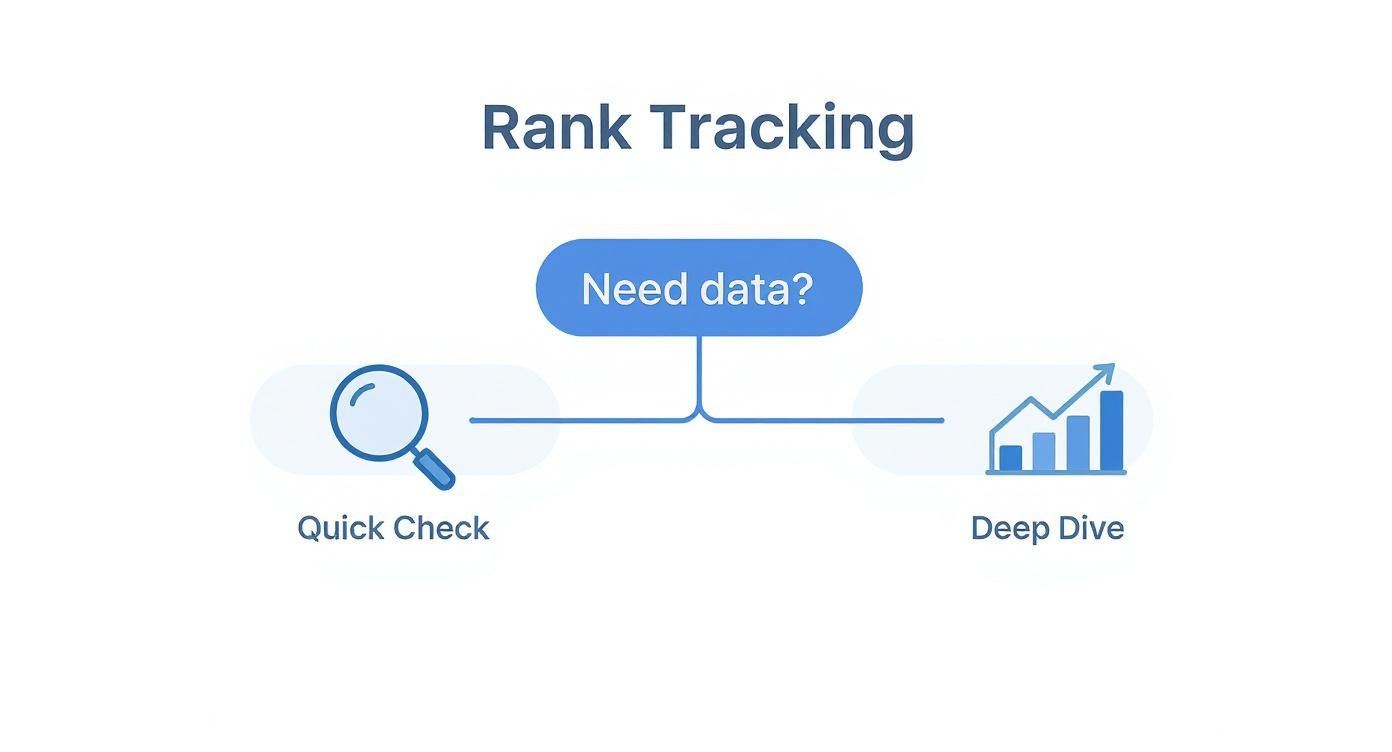
As you can see, a quick spot-check is fine for a one-off question. But for any kind of serious, ongoing analysis, you're going to need a proper tool.
Comparing Your Rank Tracking Options
To help you decide, let's break down the pros and cons of the main methods for checking your keyword positions.
Method | Cost | Accuracy | Scalability | Best For |
|---|---|---|---|---|
Manual Checks | Free | Low (personalized results) | Very Low | Quick, one-off spot checks for a single keyword. |
Google Search Console | Free | Medium (averages) | Medium | Getting a high-level view of performance and finding keyword opportunities. |
Dedicated Rank Tracker | Paid | High (unbiased, localized) | Very High | Daily tracking, competitor analysis, and deep SERP feature insights. |
Ultimately, while free options are useful starting points, a dedicated rank tracker is the only method that provides the accurate, scalable data needed for a serious SEO strategy.
Matching the Tool to Your Needs
You don't necessarily need the most expensive, feature-packed software on the market. The right tool is the one that fits your specific situation and goals.
Let's walk through a few common scenarios.
The Solo Blogger on a Budget: Your main concerns are cost and ease of use. You just need to track the core keywords for your top 10-20 articles without going broke. Look for tools that have a solid free plan or a low-cost entry tier that focuses purely on rank tracking, not a bunch of extras you'll never touch.
The Growing E-commerce Store: You're juggling hundreds of product pages and category keywords. Scalability and localization are everything. You need a tool that can handle a ton of keywords, track rankings in all the different cities you ship to, and give you a clear picture of your mobile performance—which is where most of your shoppers are.
The Full-Service Marketing Agency: In this world, reporting and client management are king. You need a powerful platform with white-label reports, API access for building custom dashboards, and the ability to neatly segment keyword campaigns for each client. Deep competitor and SERP feature tracking are also non-negotiable for proving your value.
Choosing a tool is about aligning its capabilities with your operational reality. A solo creator doesn’t need a complex agency tool, and an agency can't function with a basic keyword checker.
While most of us will be best served by an off-the-shelf tool, some developers or data scientists might want to build their own custom solution. If that's you, understanding how to scrape Google search results is the first step. For everyone else, a dedicated tool gives you the perfect mix of power and convenience, letting you focus on strategy instead of getting stuck on data collection.
Setting Up Your First Tracking Campaign
Alright, you've picked a rank tracking tool. Now comes the important part: setting it up to give you data you can actually use. A poorly configured campaign is just digital noise. But when you get it right, your tracker becomes the command center for your entire SEO strategy.
Your first instinct will be to dump in your core keywords. Go for it. These are the big-picture terms your content is built around—your main services, product lines, or the pillar topics for your key articles. But don't just stop there. The real wins often come from the less obvious, high-converting long-tail keywords you've been targeting.
Balancing Head Terms and Long-Tail Keywords
Look, it’s easy to get fixated on those high-volume "head" terms like "content marketing" or "SEO software." Seeing a top-10 ranking for one of those feels great, but the competition is brutal and the traffic isn't always ready to buy.
This is where long-tail keywords—those longer, more specific phrases—become your secret weapon. They are far more than just a theory; they're how most people actually search. In fact, long-tail keywords now account for a whopping 70% of all global search traffic.
While the search volume for any single long-tail term might seem small, their conversion rates can be 2.5 times higher than their short-tail cousins. Why? Because they signal exactly what the user wants. If you want to dive deeper into this, you can read the full research about long-tail keyword performance. Your tracking campaign needs to mirror this reality, keeping an eye on both your big, aspirational terms and the specific queries that bring in qualified leads.
Organize Your Keywords with Tags and Groups
A flat list of 100+ keywords is a headache to sort through. To pull out any meaningful insights, you need to organize them from day one. Pretty much every good rank tracker lets you use tags or create groups for this very reason.
Get in the habit of segmenting your keywords logically. Here are a few ways I've seen work really well:
By Content Cluster: Lump together all the keywords related to a specific topic hub on your site.
By User Intent: Create tags like "informational," "transactional," or "navigational" to see what kind of traffic you're attracting.
By Funnel Stage: Tag keywords based on whether they target top-of-funnel awareness, mid-funnel consideration, or bottom-of-funnel decision-makers.
By Page: Group all the keywords you're trying to rank a single page for. Our guide on how many keywords per page can help you dial in this strategy.
Doing this lets you move beyond simple rank checks. You can start seeing patterns, like whether your bottom-of-funnel keywords are dropping while your top-of-funnel content is soaring.
A well-tagged campaign lets you quickly answer strategic questions. Instead of just asking "How are my rankings?" you can ask, "How is my content cluster on 'email marketing' performing for transactional keywords on mobile devices?"
Configure Location and Device Tracking
Finally, don't forget to tell your tool where and how to check your rankings. If you run a local business, seeing your national rank is almost completely useless. You need to configure your tracker for the specific city, state, or even zip code where your customers live.
Think about it: a local pizzeria doesn't care about its rank for "best pizza" in a state 500 miles away. They need to monitor their mobile rankings for "pizza delivery downtown" and "gluten-free pizza near me" right within their delivery radius. Getting this right ensures the data you collect is tied directly to your business goals, showing you exactly how visible you are to the people who can actually become customers.
How to Analyze and Act On Your Ranking Data
Getting your hands on keyword ranking data is the easy part. The real magic happens when you turn those numbers into a concrete action plan. A rank tracker shows you what’s happening, but solid analysis reveals why it’s happening and tells you exactly what to do next.
Every little shift in your rankings is telling you a story. You just have to learn how to read the signals.
Decoding Different Ranking Movements
Not all changes in the SERPs carry the same weight. You have to know the difference between a minor hiccup and a major trend to make the right call.
Sudden Drops: A steep, sudden drop across a bunch of keywords is a serious red flag. This usually points to a technical problem—maybe an accidental
noindextag, server errors, or even a manual penalty from Google. The first thing you should do is a full technical site audit.Gradual Declines: Watching a page slowly slide down the rankings is often a classic case of content decay. It means your competitors are putting out fresher, better content, or what people are searching for has changed. This is your cue to go in and give that page a major content refresh.
Positive Jumps: When a keyword leaps from page two onto page one, you know you're doing something right. Now’s the time to double down. Can you build more internal links to that page? Can you write some supporting articles to build out the topic cluster?
Your ranking data is a feedback loop. Think of it less like a report card and more like a roadmap showing you exactly where to focus your energy for the biggest wins.
Correlating Rankings with Business Metrics
Let's be honest, rankings alone don't pay the bills—traffic and conversions do. To see the real business impact of your SEO work, you have to connect your ranking data with your analytics.
For example, if a keyword jumps from position #6 to #3, pop over to Google Analytics. Did that page see a real increase in organic clicks and conversions? Taking this extra step helps you figure out which keywords are actually worth fighting for.
Once you have your data, you need to plug it into the bigger picture of how you measure overall SEO performance to truly understand how your efforts are paying off.
Analyze Competitor Rankings for Opportunities
Your rank tracker isn't just for looking at your own site; it’s a powerful competitive intelligence tool. Keeping an eye on your competitors’ rankings can show you where the strategic openings are.
Look for keywords where their positions are bouncing around or starting to slip. This might signal a page they've started to neglect, which is your chance to create something better and snatch that spot. On the flip side, analyzing their top-performing pages can give you clues about their authority and backlink strategy. Our guide on how to find domain authority can help you dig deeper into evaluating their strength.
Remember, the device people are using matters. With mobile searches making up 61.5% of global traffic and Google owning 93.88% of the mobile market, you can't afford to ignore mobile-specific rankings. Google even shows slightly different results on mobile versus desktop, creating unique competitive landscapes on each platform. You can find more insights in these useful SEO statistics from Keyword.com.
Got Questions About Keyword Rankings? Let's Clear Them Up.
Once you start digging into your keyword rankings, you'll inevitably run into a few questions that pop up time and time again. I've been there. Getting these sorted out early on will save you a ton of headaches and help you make sense of the data you're seeing.
Think of this as the "things I wish I knew sooner" guide to rank tracking.
Why Are My Keyword Rankings All Over the Place?
If you're seeing your rankings jump around from day to day, take a deep breath. It's totally normal. The search results pages are living, breathing things, not static lists.
Here's what's usually behind the constant movement:
Google's Constant Tinkering: Google is always tweaking its algorithm. Sometimes it's a tiny, unannounced change; other times, it's a major core update that shakes things up for everyone.
Your Competitors Aren't Sleeping: The other sites ranking for your terms are also busy. They're publishing new posts, updating old ones, and building links. Their moves can easily nudge you up or down.
Searcher Whims: User behavior is fickle. What people are clicking on and how they're searching can change, and Google adjusts the results to match.
A single bad day is usually just noise. But if you see a steady slide for a few weeks? That's your cue to dig in and figure out what's going on.
My best advice? Look at the bigger picture. A one-month trend tells you a story; a one-day blip is just a distraction.
How Many Keywords Should I Actually Be Tracking?
This is a classic "it depends" situation, but I can give you some solid guideposts. There's no magic number here; it all comes down to your site's size and what you're trying to achieve.
A local plumber might only need to keep an eye on 20-50 highly specific, local keywords to know if their SEO is working. On the flip side, a big online retailer could be tracking thousands of keywords across dozens of categories.
If you're just starting out, a good rule of thumb is to track the main keywords for your top 10-20 pages. Add in your primary "money" keywords (the ones that directly lead to sales or leads) and, of course, your brand name. You can always add more as you create more content.
Is It Okay to Just Check My Rankings Manually?
Popping open an incognito window for a quick spot-check is fine for satisfying your curiosity. But for making real, strategic decisions? It's just not reliable enough.
Even when you're "incognito," your results are still colored by your physical location and past search behavior in subtle ways. It gives you a skewed picture of reality.
This is where automated rank tracking tools earn their keep. They pull clean, objective data from a specific location, without any of the personalization that messes with your manual checks. They let you see historical trends across hundreds of keywords—something that's flat-out impossible to do by hand. They take the guesswork out of the equation.
Blogs
More Blogs
From keyword goldmines to AI-driven content hacks—expert insights to help your blog posts dominate the first page.


